B2B Sales
Checklist for Automating Sales Prospecting Tasks
Apr 23, 2026
Automate repetitive prospecting: clean CRM data, enrich leads with AI, use signal-based outreach, and track ROI.
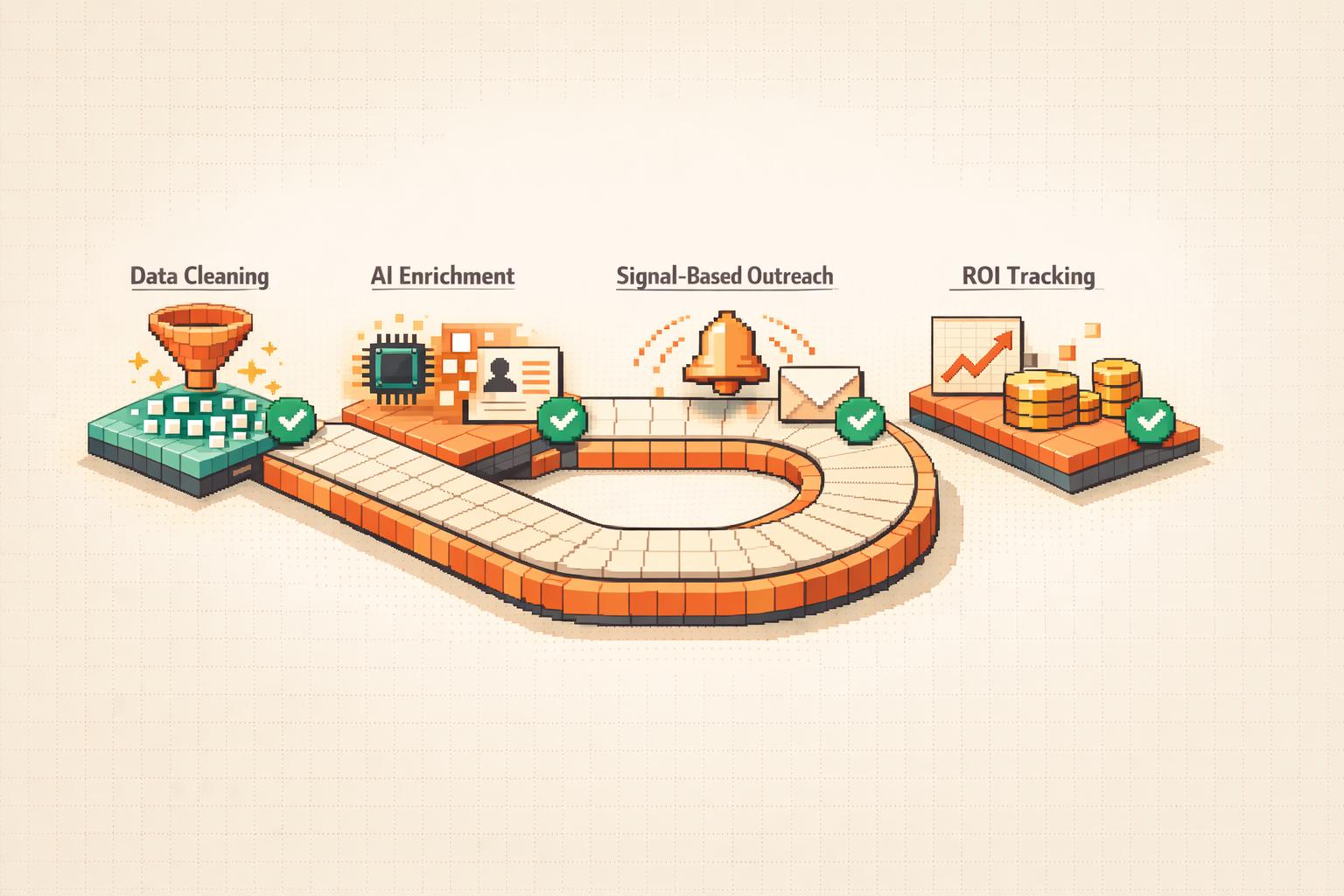
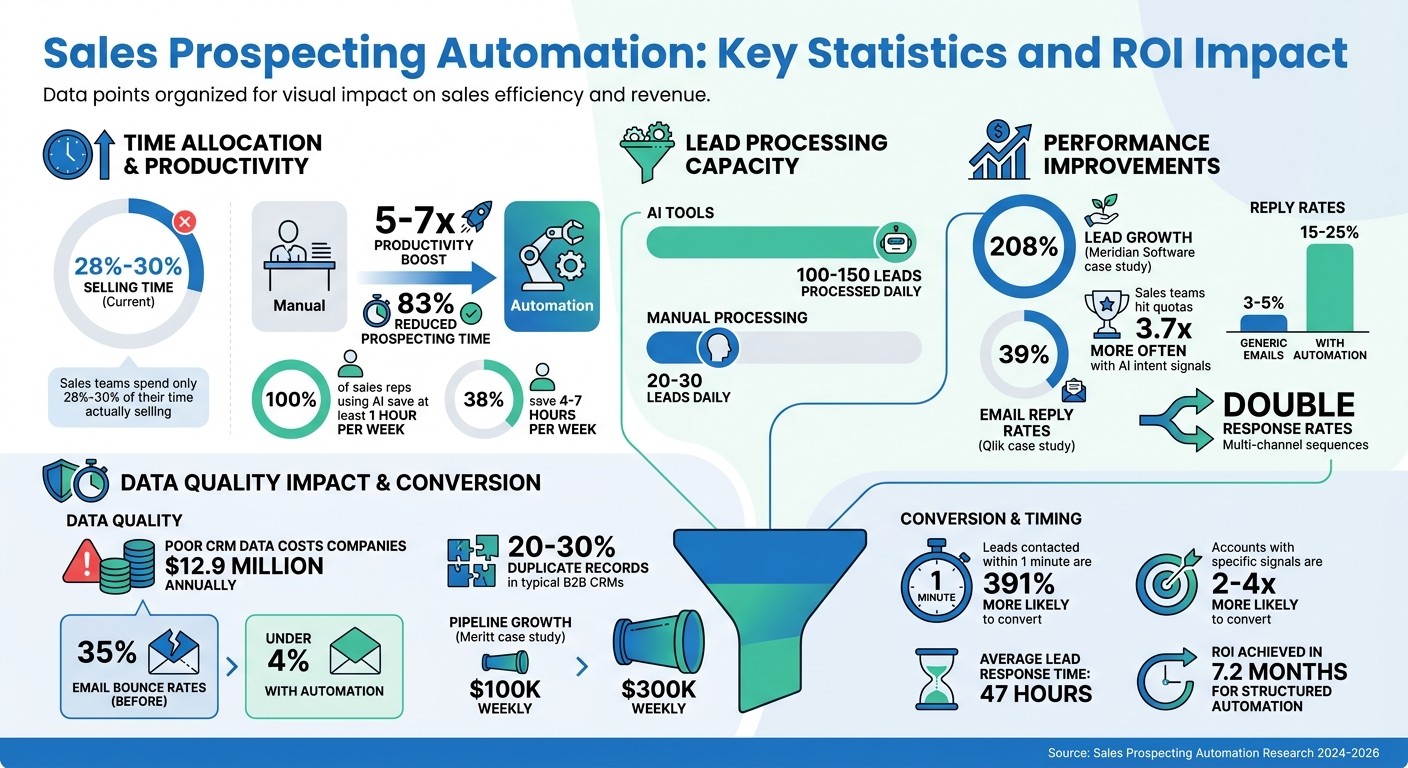
Sales teams spend just 28%-30% of their time selling, with the rest lost to repetitive tasks like data entry and research. Automation can reclaim this time, boosting productivity by 5-7x and cutting prospecting time by 83%.
Here's what you need to know:
AI tools can process 100-150 leads daily, compared to 20-30 manually.
Companies like Meridian Software and Qlik have seen 208% lead growth and 39% email reply rates with automation.
AI detects intent signals (e.g., funding rounds, leadership changes), helping sales teams hit quotas 3.7x more often.
To automate effectively:
Audit your prospecting process to find repetitive tasks.
Set measurable goals tied to KPIs like SQL conversion rates.
Clean up CRM data - duplicate records can cost millions in missed opportunities.
Use AI tools like ChatGPT for Teams for lead enrichment, scoring, and outreach sequencing.
Track results, test workflows, and refine strategies regularly.
The result? More time for selling, higher lead quality, and improved revenue growth.
Sales Prospecting Automation: Key Statistics and ROI Impact
Preparation Steps Before Automating
Review Your Current Prospecting Process
Before diving into automation, take a close look at how your B2B sales playbook operates today. Map out every step - from discovering leads to making first contact and entering data into your CRM. This will help you spot repetitive, time-consuming tasks and bottlenecks, like lengthy back-and-forth emails for scheduling [8][9]. A digital whiteboard can be a great tool for visualizing these workflows and identifying where manual work slows things down.
Start by targeting "quick wins" - tasks such as building lists, entering data, or tracking follow-ups. These are often ripe for automation, especially since 41% of employee time is spent on tasks that don’t add much value to the organization [8]. By understanding these areas, you’ll know exactly where automation can make an immediate impact.
Define Clear Automation Goals
Set specific, measurable goals for what you want automation to achieve. For instance, aim to cut research time or improve lead qualification rates within a 90-day timeframe. Tie these goals to key performance indicators (KPIs) like time-to-first-touch, research time per prospect, or Sales Qualified Lead (SQL) conversion rates. These metrics will give you a clear "before" picture to measure your progress against.
Keep in mind that automation should free up time for building relationships, not just speed up a flawed system. By focusing on personalization and compliance, you can ensure your automation efforts enhance, rather than hinder, your sales process. It’s also worth noting that while automation can handle many tasks, human interaction remains crucial in certain stages - especially since 75% of B2B buyers prefer direct contact when dealing with complex transactions [8].
Clean Up Your CRM Data
Start with a thorough data audit to clean up your CRM. This means removing duplicate records, filling in missing fields, and eliminating outdated contacts. Poor CRM data can cost companies an average of $12.9 million annually in lost productivity and missed opportunities. Plus, it’s not uncommon for B2B CRMs to have 20% to 30% duplicate records [10]. Strong data hygiene is essential for making automation effective.
Aim for at least 80% CRM adoption and ensure 90% of your core fields are filled in [7]. Standardize data formats, like using ISO country codes or consistent job titles, and deduplicate records to avoid scaling issues. For example, in 2026, Meritt adopted Prospeo for data enrichment, which cut their email bounce rate from 35% to under 4% and boosted their weekly pipeline from $100,000 to $300,000 [11].
"Automation without data hygiene is just faster failure." - Nadeem Azam, Founder, Rep [1]
Choosing and Connecting Automation Tools
Select AI-Powered Prospecting Tools
Once you've chosen your AI tools, the next step is integrating them with execution-focused coaching to complete your automation setup. The right tools should do more than just speed up email delivery - they need to identify and engage prospects at the perfect moment. Look for platforms that monitor buying signals like leadership changes, funding rounds, or new tech implementations. These signals can trigger personalized outreach, boosting reply rates to an impressive 15% to 25%, compared to the typical 3% to 5% seen with generic cold emails[5].
Another key feature to prioritize is sequential data enrichment, which pulls data from multiple providers to achieve match rates above 90% for contact details. This is crucial because leads contacted within an hour of showing interest are far more likely to qualify[5]. Additionally, deep CRM integration is a must-have. Opt for tools with native two-way syncing capabilities for platforms like Salesforce or HubSpot. This ensures activities are logged automatically, maintaining a single source of truth without requiring manual updates.
Modern prospecting tools are moving beyond simple rule-based automation. They now include autonomous agents that can research prospects, reason through data, and even manage initial conversations with minimal human oversight. For instance, in 2024, Qlik used Salesloft for lead qualification and sequencing. This tool reduced qualification times by 67%, generated $14 million in pipeline, and achieved an email reply rate of 39%[1]. Make sure your chosen tool supports multichannel outreach for maximum effectiveness.
"AI is not just automation, it is intelligence applied to finding the right prospect at the right moment with the right message. Automation without intelligence is spam at scale." - GetSalesClaw Buyer's Guide[12]
Before committing to a platform, ensure it includes human-in-the-loop controls like draft reviews or approval loops. These features help maintain the quality of AI-generated messages. Also, double-check that the tool complies with standards like ISO/IEC 42001:2023 for ethical AI governance and GDPR for data privacy. Starting with a pilot program is a smart way to test its ROI before rolling it out on a larger scale.
Add Coach Pilot to Your Sales Workflows
Ensuring compatibility between your tools and CRM sets the stage for integrating AI-enhanced coaching to improve performance. That’s where Coach Pilot comes in. This platform bridges the gap between automation and execution by embedding AI-driven coaching directly into your sales workflows. It creates tailored sales playbooks that standardize your prospecting approach, ensuring every rep follows proven strategies when working with leads identified through automation.
Coach Pilot works seamlessly with your existing systems, offering real-time feedback as your team handles daily tasks. Sales reps get immediate guidance on messaging, handling objections, and determining next steps - all without needing to jump between platforms. The platform also analyzes team performance, delivering personalized, in-platform coaching designed to improve conversion rates. When you combine automated prospecting tools with Coach Pilot’s integrated coaching, you create a streamlined system where technology finds the right prospects, and smart coaching helps your reps close deals more efficiently.
Setting Up Core Automation Processes
Automate Lead Finding and Data Enrichment
Start by defining an AI-ready Ideal Customer Profile (ICP). This should include details like technographics (the technology a company uses), behavioral signals (e.g., website visits or content downloads), and organizational changes such as funding rounds or hiring spikes [7][1]. These details help your AI system zero in on prospects that are genuinely qualified.
Next, connect your CRM to multiple data sources using waterfall enrichment. This method involves querying one data provider (like Clearbit), then filling in any gaps with others (such as ZoomInfo or Apollo). For example, in 2024, Meridian Software used Apollo.io and AI tools to cut SDR prospecting time from 25 hours to just 6 hours per week. This approach also boosted their qualified leads from 60 to 185 per month [2]. By automating everything from discovery to research, sales reps could focus solely on pre-qualified and scored leads.
Don't skip automated email and phone verification. Meritt saw its weekly pipeline grow from $100,000 to $300,000 by adopting an automated system that reduced email bounce rates from 35% to under 4% [6]. Keeping bounce rates below 2% not only protects your sender reputation but also ensures your messages actually reach prospects [2][6]. To avoid disruptions, set up asynchronous enrichment that works in the background after a lead enters the CRM, preventing API issues from blocking records [13].
Finally, use automated lead scoring frameworks like BANT (Budget, Authority, Need, Timeline) to identify high-value prospects. Razorpay, for instance, implemented machine learning for lead scoring and saw a 50% jump in monthly Gross Merchandise Volume, all while cutting manual work by 70% [1]. With enriched and verified leads, your outreach process becomes much more efficient.
Create Automated Outreach Sequences
Use signal-based triggers to time your outreach when prospects show buying intent. Examples include funding announcements, leadership changes, or new tech stack additions [1][15][16]. Timing is everything - leads contacted within one minute are 391% more likely to convert than those contacted after 30 minutes [1].
Adopt a multi-channel outreach strategy that includes email, LinkedIn, phone, and video. Solely relying on email has become less effective, with a 29% drop in results by 2025. Multi-channel sequences, on the other hand, double response rates [14]. Aim for 8–12 touchpoints over 3–4 weeks, and make each interaction meaningful by sharing insights, data, or resources instead of repeating the same message [14].
Meridian Software improved its reply rates from 4.2% to 16.8% by automating its workflow with AI-drafted, personalized sequences [2]. The key was letting AI handle tasks like research and initial drafts while keeping humans involved for relationship building and final approvals. For the first few weeks, have your team review AI-generated emails to refine prompts. You can later move to spot-checking [2][14].
Keep your cold emails short - between 50 and 125 words - and aim for a 3rd- to 5th-grade reading level. Simpler emails get 67% more replies [16]. To protect your sender reputation, use secondary domains for outreach, authenticate with SPF, DKIM, and DMARC, and limit daily email volumes to under 50 per account [14][16]. Once your outreach is running smoothly, track prospect behavior to fine-tune your approach.
Turn On Behavioral Tracking and Alerts
Real-time alerts can turn your prospecting into a proactive process. Use webhooks for instant notifications, allowing your team to engage with prospects within minutes of a trigger event [17]. Track both company-level signals (e.g., funding rounds or hiring surges) and individual signals (like job changes or LinkedIn activity) to reach out at just the right moment [17][15].
Set up alerts to tag high-intent visitors, such as those who view your pricing page three or more times. Configure workflows to deliver relevant content based on browsing behavior. For instance, if a prospect checks out your security pages, the system could send them compliance-related case studies. Accounts targeted based on specific signals are 2–4 times more likely to convert than cold leads [15].
Ensure your automated sequences pause immediately when a prospect engages - whether through a reply, meeting booking, or form submission [4][7]. Nothing damages credibility like sending a follow-up email after a prospect has already responded. For high-value signals, like C-suite job changes, use a human-in-the-loop system where AI drafts the response, but a representative approves it before sending [18].
Go beyond basic engagement metrics by tracking specific pages visited, visit frequency, and time spent on your site [1][4]. Set up "at-risk" alerts to flag deals where engagement drops, close dates are delayed, or key contacts go silent for more than a week [4]. With the average lead response time currently at 47 hours [1], effective automation can help you beat that benchmark and stay ahead.
Balancing Personalization and Compliance
Use AI for Personalized Messages
AI can take personalization to the next level by analyzing buying signals - like SEC filings, hiring trends, or funding announcements - to create messages that directly address a prospect's business challenges. This approach has been shown to boost reply rates to as high as 18%, which is 5.2 times better than generic outreach [19]. Despite these results, only 5% of sales teams personalize every email, even though 73% of B2B decision-makers say personalization is a major factor when considering vendor outreach [19].
To keep messages authentic, involve human oversight and AI-powered coaches to align AI-generated content with your brand voice [20][22][19]. For high-value accounts, conduct detailed, multi-layered research. For larger audience segments, rely on AI to scale personalization efforts [19][21]. Start your emails with a tailored observation about the recipient's situation rather than diving into a product pitch. Using softer calls-to-action, like asking, "Worth a 15-minute call?" can double your conversion rate compared to more forceful meeting requests [19].
While personalization can significantly enhance engagement, it's equally important to stay compliant with data privacy laws.
Follow Data Privacy Regulations
Personalization is powerful, but it must be balanced with strict adherence to data privacy laws. Violating GDPR can result in fines as high as €20 million or 4% of global annual revenue [23][24], while non-compliance with the US CAN-SPAM Act could lead to penalties of up to $53,088 per email [29]. Additionally, starting January 27, 2026, the FCC will require explicit, individual consent for each specific seller, making shared consent mechanisms obsolete [31].
To stay compliant, automation must process opt-out requests within 24 hours [25][27]. Email providers like Gmail and Yahoo now demand bulk senders maintain a spam complaint rate below 0.3% [26]. Proper domain authentication (SPF, DKIM, and DMARC) is also critical [26][27]. Use email verification tools to clean up invalid addresses, as high bounce rates can trigger spam filters and draw regulatory attention [28][32].
For B2B outreach in the EU, document a Legitimate Interest Assessment to justify why your product is relevant to the recipient's professional role [29][30]. Limit data collection to essentials like name, role, and company, and avoid gathering personal details from social media, which can feel invasive [25][26]. Implement automated data deletion policies to remove information for non-responders within 90–180 days [26][27]. Ensure your AI tools are enterprise-grade to prevent prospect data from being used to train public models [32][21].
Regulation | Key Requirement | Penalty Risk |
|---|---|---|
GDPR (EU/UK) | Legitimate Interest basis; immediate opt-out processing | |
CAN-SPAM (US) | Truthful headers; clear unsubscribe mechanism | Up to $53,088 per violation [29] |
FCC One-to-One Rule | Explicit consent for each individual seller | $500–$1,500 per violation [31] |
Tracking Results and Making Improvements
Monitor Key Metrics and Performance
Keeping an eye on key metrics is essential to understanding the return on investment (ROI) of your automation efforts. Start by focusing on leading indicators like the Pipeline Coverage Ratio, Reply Rate, and Meeting-to-Opportunity Conversion Rate. These metrics help predict revenue trends and highlight when adjustments may be necessary [33]. On the other hand, outcome indicators such as Win Rate by Stage, Customer Acquisition Cost (CAC), and Revenue per Rep provide a clearer picture of whether your automation strategy is delivering over the long haul [33].
Don’t overlook efficiency metrics, which reveal operational improvements. For instance, sales reps using AI tools report significant time savings - 100% save at least an hour per week, while 38% save between four and seven hours [1]. Metrics like "time spent in workflow" and "action completion rates" can help identify where prospects are dropping off or losing interest [34][8].
It’s also crucial to compare engagement across different channels. Dive into response rates, open rates, and meeting booking rates for email, LinkedIn, and phone outreach [8][35]. For example, email-only lead rates saw a 29% decline in 2025, underscoring the importance of diversifying your strategy [1]. To benchmark your performance, aim for industry standards like email open rates above 40% and reply rates between 8% and 15% for cold outreach [35].
By tracking these metrics and making data-driven adjustments, you can keep your automation strategies effective and aligned with your goals.
Test and Refine Your Automation
Once you’ve gathered insights from your metrics, the next step is refining your automation strategy through consistent testing. Systematic A/B testing is a powerful way to improve results. Experiment with subject lines, timing, and the sequence of outreach channels to uncover incremental gains [8][37]. Keep in mind that 80% of sales require at least five follow-ups to close, yet nearly half of salespeople give up after just one attempt [37]. Use branching logic to adapt your approach - if a prospect doesn’t reply to an email, for instance, follow up with a LinkedIn connection request [8].
Regularly auditing your lead scoring models is another critical step. Review them every three months to ensure they accurately reflect high-intent behaviors and avoid unintentional biases against certain segments [34]. A great example comes from Sandler, which implemented HubSpot Breeze AI between 2024 and 2025. By fine-tuning their automation based on performance data, they managed to cut their sales cycle in half and generate four times more Sales Qualified Leads [1].
Watch for warning signs like high unsubscribe rates or a declining sender reputation - these could indicate that your workflows are too aggressive or lack the personal touch [1]. When rolling out new automations, start small with a pilot group of 5–10 reps. This allows you to identify and fix any technical glitches before scaling the strategy across your entire team [8][36].
Continuous testing and refinement ensure that your automation efforts remain effective and well-tuned to your audience’s needs.
Best AI Agents for Sales Productivity & CRM Automation | ClickUp
Final Checklist
Here’s a quick rundown to ensure your sales prospecting automation is ready to roll.
Start with the basics. Double-check the quality of your CRM data to avoid issues caused by inaccuracies [1]. Create a well-defined Ideal Customer Profile (ICP) by narrowing down specifics like industry, company size, tech stack, or even recent funding activity [2]. Make sure you've also outlined clear metrics and mapped out the steps of the sales journey [38].
Pick and connect the right tools. Opt for AI-powered prospecting tools that seamlessly integrate with your CRM and communication platforms - this helps prevent messy data silos [38][3]. Consider adding tools like Coach Pilot for AI-driven coaching and personalized playbooks. For a smooth rollout, test it with a small group of three to five top performers over two weeks before scaling it across the team [40][2].
Set up key automations. Automate tasks like lead sourcing and data enrichment overnight. Implement multi-channel outreach sequences spanning email, LinkedIn, and phone. Activate behavioral tracking with real-time alerts for high-intent actions [1][39]. To maintain quality, have humans review AI-generated messages during the first month to ensure they align with your brand's voice [38][2].
Once everything is live, the focus shifts to fine-tuning.
Monitor, test, and improve. Keep an eye on metrics related to efficiency, engagement, and overall business impact [38][35]. Fun fact: businesses with structured sales automation processes typically see a return on their tech investment in just 7.2 months [38].
FAQs
Which prospecting tasks should I automate first?
Focusing on automating repetitive, time-draining tasks can make a huge difference for your sales team. Tasks like:
Finding companies and verifying contact details
Sending initial outreach and follow-up emails
CRM data entry
By automating these activities, your team can spend less time on routine work and more time connecting with qualified leads and closing deals. This shift not only saves time but also enhances overall efficiency and productivity.
How clean does my CRM data need to be before automating?
Your CRM data needs to be clean and accurate before diving into automating sales prospecting tasks. Why? Because automation relies on trustworthy information. Problems like duplicate entries, outdated contacts, or incomplete records can throw everything off track.
To keep things running smoothly, make regular data hygiene a priority. This means validating and enriching your records consistently. By doing so, you’ll ensure your outreach stays precise and your insights remain reliable.
How do I automate outreach without risking compliance or deliverability?
To streamline outreach efforts while staying compliant and maintaining high deliverability, it's crucial to stick to ethical practices. Respect privacy laws by sourcing data from legitimate platforms like LinkedIn, and always provide recipients with an opt-out option in your messages.
Leverage tools that can identify potentially risky language or non-compliance issues before hitting send. Keep thorough documentation of your data sources and the legal justifications for using them. Additionally, ensure your workflows align with platform guidelines and regulatory requirements to scale your outreach safely and effectively.
Related Blog Posts

Remove the guesswork from winning more deals.