B2B Sales
How AI Simplifies CRM Updates for Sales Teams
Apr 25, 2026
Automate CRM updates with AI to save 5 to 12 hours per rep, improve data accuracy, and streamline sales workflows.
Sales reps spend 70% of their time on non-selling tasks, like CRM updates, losing 4.5–6 hours weekly. Manual data entry also causes errors, with only 30–40% of CRM records being accurate, costing U.S. businesses over $600 billion annually. AI tools solve this by automating CRM updates using Natural Language Processing (NLP), saving 8–12 hours per week per rep and improving data accuracy to over 90%.
Key benefits include:
Time savings: AI reduces CRM update time from hours to minutes.
Improved accuracy: Real-time updates ensure cleaner, more complete data.
Higher productivity: Reps focus on selling, not admin tasks.
AI tools like Coach Pilot integrate with platforms like Salesforce and HubSpot, extracting details from sales calls and automating updates. Features like voice-to-CRM commands and automated task creation further streamline workflows using a B2B sales playbook, helping teams close deals faster and forecast revenue more reliably.
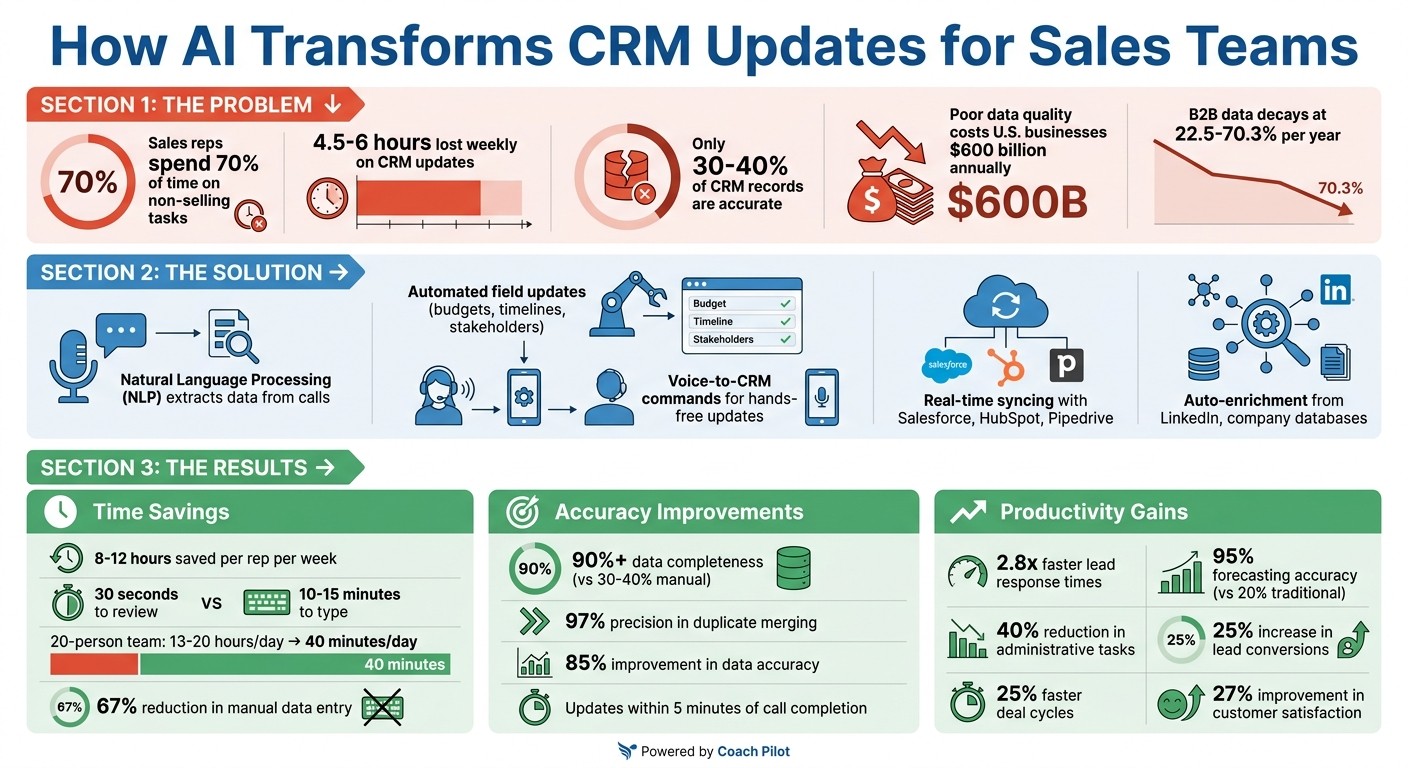
AI-Powered CRM Automation: Time Savings, Accuracy & Productivity Benefits for Sales Teams
How HubSpot’s AI is Revolutionizing Sales & CRM Automation
Benefits of AI-Driven CRM Automation
AI-powered CRM automation brings three major perks to the table: saving time, improving data accuracy, and boosting productivity. These benefits directly influence a company’s efficiency and overall revenue.
Time Savings and Efficiency Gains
Did you know the average sales rep spends about 4.5 hours a week on manual CRM updates? That’s a lot of time taken away from selling. By introducing automation, teams can reclaim at least 2–3 hours weekly - and in some cases, as much as 8–12 hours [1][6]. For example, in a 20-person sales team, the time spent on CRM updates could drop from 13–20 hours per day to just 40 minutes [3].
"The problem isn't that reps don't care about data quality - it's that manual entry competes with their primary job: selling."
AskElephant [1]
AI takes over the tedious task of data entry by analyzing call transcripts using natural language processing. It extracts critical details - like budgets, timelines, stakeholders, and next steps - automatically. After a call, reps can review and approve AI-suggested updates in just 30 seconds, compared to the 10–15 minutes they’d typically spend typing [3]. It also handles follow-ups, ticket creation, and reminders without requiring users to jump between tools [3][7].
This saved time doesn’t just free up schedules - it also creates an opportunity for more precise data collection.
Better Data Accuracy
Manual CRM entries are often incomplete, with only 30–40% of records being fully accurate [3]. AI changes the game, achieving over 90% data completeness by capturing details consistently and in real time. For instance, it can interpret conversational cues like, “Our budget cycle starts in Q3,” and translate that into structured CRM fields like “Close Date” or “Budget Timeline” [3]. Updates are made within five minutes of a call wrapping up [3].
Beyond this, AI-powered systems maintain data hygiene by validating email addresses, standardizing company names, and merging duplicate records with an impressive 97% precision rate [5].
Higher Productivity
By automating repetitive tasks, AI allows sales reps to focus on what they do best: connecting with prospects and closing deals. Managers also benefit from instant access to accurate deal updates right after calls [1][8].
AI doesn’t stop there. It enriches CRM data by pulling in firmographic details - like company size, funding history, and LinkedIn profiles - from external sources [4][6]. It even advances deal stages automatically based on activity signals, such as booked meetings or sent proposals [4]. This reduces the need for constant tool switching and keeps reps laser-focused on revenue-driving activities, effectively turning your sales process into a living AI.
How AI Automates CRM Updates
AI-powered tools are transforming how CRM systems are updated by capturing conversation data, integrating it directly into your CRM, and enabling hands-free updates. Here's a closer look at how it all works.
Data Extraction Using NLP
The process starts with AI recording sales calls through platforms like Zoom, Teams, or Google Meet. Using speech-to-text APIs, the audio is converted into transcripts in real time [1]. From there, AI analyzes these transcripts to identify and pull out key details - such as budgets, timelines, decision-makers, and objections [1]. It also extracts structured information like dollar amounts, company names, dates, and contact details [1].
Speaker diarization ensures that action items are accurately attributed to the right person, which helps avoid duplicate follow-ups [9]. Once the data is organized, it’s sent directly into your CRM using advanced integrations. APIs built into platforms like Salesforce, HubSpot, or Pipedrive handle these updates within minutes, eliminating the need for any manual data entry [1].
Integration with CRM Platforms
Connecting AI tools to your CRM involves a few technical steps. For example, integrating with Salesforce requires setting up a Connected App and enabling OAuth [13]. After that, you map the AI-extracted data to the appropriate CRM fields [1] and define update rules. These rules decide whether the AI should overwrite existing data, add to it, or only fill empty fields.
This integration pays off: teams using CRM-connected AI tools have seen a 2.8x improvement in lead response times [11]. And companies that respond to leads within five minutes are 100x more likely to connect than those that wait 30 minutes [2].
Here’s a quick comparison of how some popular CRM platforms handle API integrations:
CRM Platform | API Type | Integration Complexity | Key AI Feature |
|---|---|---|---|
HubSpot | REST API v3 | Low (2–4 days) | Easy OAuth setup and excellent documentation [11] |
Salesforce | REST/Bulk/Events | High (1–2 weeks) | Real-time updates via Platform Events [11] |
Pipedrive | REST API | Low (1–3 days) | Simple, deal-focused architecture [11] |
GraphQL API | Medium (2–4 days) | Precise data fetching with GraphQL [11] |
Before launching, it’s essential to test the setup. Run 5–10 test calls to ensure that NLP extraction works correctly and the right CRM fields are being updated [1]. Deploying automation in stages - starting with low-risk fields like call notes before moving on to deal stage updates - helps minimize errors during rollout [1][15].
Voice Command Features for Field Reps
Voice commands are another game-changer for CRM updates. Reps often lose valuable time to administrative tasks [2], but AI-powered voice commands let them update CRM records while on the go. Whether driving, walking, or waiting, reps can simply speak commands like, “Update the Johnson deal to negotiation stage” [2].
These systems also integrate with messaging apps like WhatsApp, Telegram, or SMS. Voice notes can be automatically transcribed and synced to CRM platforms, making updates even easier [2].
"Speaking can be up to three times faster than typing"
Hints Sales AI Assistant [2]
This hands-free approach not only saves time but also improves safety by allowing reps to focus on the road. Companies using voice-to-CRM solutions have reported a 6x increase in both the volume and accuracy of logged data, capturing the 79% of opportunity-related information that often goes unrecorded [2].
Implementing AI CRM Automation with Coach Pilot

Setting Up AI-Powered Workflows
Before diving into automation, take a step back and map out your current CRM process. Document every action your team takes: who handles updates, what tools are involved, and where delays or inefficiencies crop up. This roadmap becomes the backbone for building your AI-powered workflows [16].
With Coach Pilot, you can create customized sales playbooks that align with your business needs. These playbooks include business rules, data fields, and decision logic tailored to your sales process. For instance, you can set up field mappings to link AI-extracted data - like "lead_score" - directly to specific CRM properties. Plus, you can use pre-built workflow templates to save time and streamline the setup process.
Start small with a single workflow, such as summarizing calls or capturing leads, and expand gradually. Many businesses using AI-driven CRM automation report reclaiming 10 to 20 hours a week within the first month [16]. Coach Pilot eases this transition with its phased rollout: starting in Draft mode (AI suggests changes), moving to Assist mode (human-approved updates), and finally reaching full automation [17]. This step-by-step approach helps teams gain confidence and spot potential issues early.
Before deploying automation, clean up your data. As John V. Akgul, Founder & CEO of PxlPeak, explains:
"Garbage-in-garbage-out is not a cliche - it's the primary failure mode for AI CRM integrations" [10].
This means removing duplicate records and standardizing entries like company names. Poor data quality is no small issue - it costs companies an average of $12.9 million annually, and B2B data can decay at rates ranging from 22.5% to 70.3% each year [19].
Once your workflows are mapped and your data is in good shape, you’re ready to integrate Coach Pilot with your CRM.
API Integration and Testing
To connect Coach Pilot to your CRM, you’ll need administrator permissions and OAuth 2.0 credentials [19][11]. The integration process involves mapping standard CRM objects - like Opportunities, Contacts, and Accounts - as well as custom fields to Coach Pilot's internal data model [19]. Key fields to map include Deal Stage, Close Date, Account Name, and Deal Owner. Coach Pilot supports bidirectional syncing, so coaching notes, training statuses, and deal enrichment data can flow back into your CRM [19].
Before going live, run validation tests to ensure data is being extracted and updated accurately. During the first week, set up a human review queue to catch any errors and give your team confidence in the system [19]. Businesses using AI-connected CRM tools often see 67% less manual data entry and respond to leads 2.8x faster [11].
Keep an eye on API rate limits and implement safeguards like exponential backoff and queuing to prevent throttling. For example, HubSpot caps API requests at 100 per 10 seconds [11][19]. Use environment variables for API keys instead of hardcoding them, and ensure you’ve signed Data Processing Agreements (DPAs) with your AI provider to stay compliant with regulations like GDPR [10][13].
Once integration is validated, shift your focus to monitoring and fine-tuning the system.
Monitoring and Optimizing Performance
After launching your AI workflows, tracking performance is critical. Establish benchmarks for metrics like time spent on CRM updates, data accuracy, and processing costs before automation goes live. This helps you measure ROI effectively [16].
Coach Pilot’s analytics dashboard offers insights into key metrics like processing accuracy, sync latency (aiming for under 5 minutes), exception rates, and data freshness [18]. You can set up automated alerts to flag issues like spikes in exceptions or API failures, minimizing disruptions to your sales pipeline. The platform also uses confidence scoring to flag AI-extracted fields that fall below a set threshold, prompting manual review [22].
During the first month, schedule weekly reviews, then transition to monthly check-ins. Regularly sample 50 to 100 records to ensure merge accuracy stays above 95% and profile completeness hits at least 85% within 24 hours [21]. AI-powered forecasting can achieve up to 95% accuracy compared to just 20% with traditional methods [21]. Companies using AI-enhanced CRM systems report a 40% reduction in administrative tasks and 25% faster deal cycles [13], while integrated CRM tools can boost lead conversions by 25% and improve customer satisfaction by 27% [20].
Coach Pilot’s AI coaching features and performance analytics help you identify which workflows are driving the most productivity and which ones may need tweaking.
Advanced AI Features for Sales Teams
Building on tools like automated data extraction and task management, advanced AI capabilities take CRM updates to the next level, making them smarter and more efficient.
Custom Field Updates and Data Enrichment
AI uses natural language processing (NLP) to analyze call transcripts and pull out key details like budgets, timelines, and decision-makers. For example, if a prospect mentions allocating $50,000 by Q3, the AI can automatically update the relevant budget and timeline fields in your CRM.
Automated systems also scan for missing or outdated data, pulling real-time information from sources like LinkedIn, company websites, and public filings. This is critical because nearly a third of B2B contact data becomes outdated every year, with databases decaying at a rate of 22% to 30% [23][24]. By integrating AI-driven data enrichment, teams can cut manual data entry time by 70% to 80% [23].
AI also uses fuzzy matching to clean up CRM records, merging variations like "IBM" and "International Business Machines" into a single entry [23][24]. It can even detect when a key contact or "champion" moves to a new company, automatically creating a lead and notifying the account owner [24]. These features ensure your CRM stays accurate and actionable with minimal manual effort.
Automated Task Creation and Alerts
AI doesn’t just listen - it acts. When a prospect makes a verbal commitment during a call, like promising to send a proposal by Friday, the AI creates a follow-up task in your CRM with the correct due date, no manual input needed [1].
To keep deals moving, inactivity triggers send alerts when opportunities go untouched for a set period, such as five days. This automation can boost pipeline velocity by 23% and cut lead response times by 34% [12]. AI also uses sentiment analysis to flag deals at risk. For instance, if concerning language or tone is detected in emails or calls, managers are notified to step in before the deal goes cold [14].
Tools like Coach Pilot go even further by generating "Sales-to-CS" handoff documents when a deal is marked as "Closed-Won", ensuring smooth transitions without losing key context [1]. Notes are also structured according to qualification frameworks like BANT or MEDDIC, standardizing lead qualification across the team [25]. On average, teams using AI automation save 8 to 12 hours per representative every week [12][25].
Inbox and LinkedIn Syncing

AI agents can link your CRM with platforms like Google Workspace, Microsoft 365, and LinkedIn through OAuth [26][25]. These agents scan email signatures, calendar invites, and LinkedIn profiles to automatically create or update contact records with details like job titles, company size, and social links [14][25].
By auto-capturing interactions - such as email opens, clicks, and LinkedIn messages - AI ensures your CRM maintains a complete communication history [14]. While up to 30% of CRM data becomes outdated annually, AI-powered tools can improve data accuracy by 85% [26].
Advanced AI also performs real-time sentiment analysis on incoming emails and chats, identifying high-intent prospects or flagging deals at risk based on tone [14]. As Riten Debnath, Founder of Fueler, puts it:
"In 2026, the best sales reps aren't the ones who type the fastest; they are the ones who let AI agents do the 'boring stuff' so they can actually talk to humans" [14].
With two-way syncing, any updates in the CRM are instantly reflected in the AI tool, creating a unified, always-updated workspace [14][26]. This seamless integration ensures that your team has access to accurate, real-time information whenever they need it.
Conclusion
AI-driven CRM automation is changing the game for sales teams by taking over tedious administrative tasks. By automating essentials like data entry, enrichment, and task creation, AI frees up 5 to 12 hours per rep each week [27][6]. That’s time reps can now spend building stronger client relationships and closing more deals.
But it’s not just about saving time. Poor data quality can wreak havoc on revenue, yet AI-powered systems deliver 95% data completeness while cutting down on errors like typos and missed entries [27][5]. Plus, real-time updates after calls ensure leadership has instant pipeline visibility and more reliable forecasts [1][5].
This boost in efficiency and precision enables solutions like Coach Pilot to shine. Coach Pilot integrates AI directly into sales workflows, blending custom sales playbooks, immersive training, and AI-driven coaching. By automating repetitive tasks and offering real-time guidance, it empowers sales reps to focus on what they excel at: connecting with clients and closing deals.
With AI quietly managing CRM updates in the background, your team can concentrate on selling. This doesn’t just make processes smoother - it transforms how sales teams achieve success by increasing win rates, shortening cycles, and improving forecast accuracy. AI isn’t just an upgrade; it’s a complete shift in how teams deliver results.
FAQs
How does AI know what to write in my CRM after a sales call?
AI handles sales calls by transcribing and analyzing conversations to pull out important details such as customer goals, objections, decisions, next steps, budgets, and key stakeholders. With the help of natural language processing (NLP), it captures context accurately and updates CRM fields automatically. This not only saves time but also minimizes errors. By integrating with meeting tools and CRM systems, AI ensures records are thorough and current, boosting sales efficiency and aiding better decision-making.
What CRM permissions and setup are needed to connect AI automation?
To link AI automation with your CRM, you'll need admin-level access to handle API integrations, configure field mappings, and grant data access permissions. Start by generating API credentials, such as API keys or OAuth tokens, and confirm that the AI platform has the necessary permissions to read, write, and update CRM records, including contacts, deals, and stages. For security, platforms typically require authentication methods like OAuth to ensure proper integration.
How can AI avoid overwriting good CRM data or creating duplicates?
AI helps keep CRM data clean and reliable by preventing overwriting or duplication. It does this through tools like automated deduplication, trust frameworks, and regular audits. These methods work together to verify and merge records, ensuring data stays accurate and consistent. Plus, they block new duplicates from being created, giving sales teams a dependable foundation for their work.
Related Blog Posts

Remove the guesswork from winning more deals.