B2B Sales
5 Features to Look for in Sales Coaching Software
Mar 19, 2026
Five must-have sales coaching features: AI conversation intelligence, roleplay simulations, personalized learning, performance analytics, and CRM integration.
Boost your sales team's performance with the right coaching software. Here's what to look for:
AI-Powered Conversation Intelligence: Automatically reviews calls, identifies key moments, and provides actionable feedback. Improves coaching by analyzing talk-to-listen ratios, sentiment, and behavioral patterns.
Roleplay Simulations: Offers a safe space for reps to practice real-life scenarios with dynamic AI personas. Helps improve skills for discovery calls, product demos, and executive-level conversations.
Personalized Learning Paths: Tailored training based on individual skill gaps, ensuring reps focus on areas that need improvement. Tracks progress and performance over time.
Performance Analytics: Tracks key metrics like interaction quality and process compliance. Dashboards link coaching efforts to revenue, helping managers make data-driven decisions.
CRM Integration: Embeds coaching insights directly into tools like Salesforce or HubSpot, ensuring reps get feedback without disrupting workflows.
Why it matters: Companies using these tools see up to a 41% increase in win rates and reduce ramp-up times for new hires. With features like real-time feedback and automated insights, these platforms save time and improve outcomes.
Quick Tip: Start with a pilot program to test software, align it with your team’s goals, and measure its impact on performance.
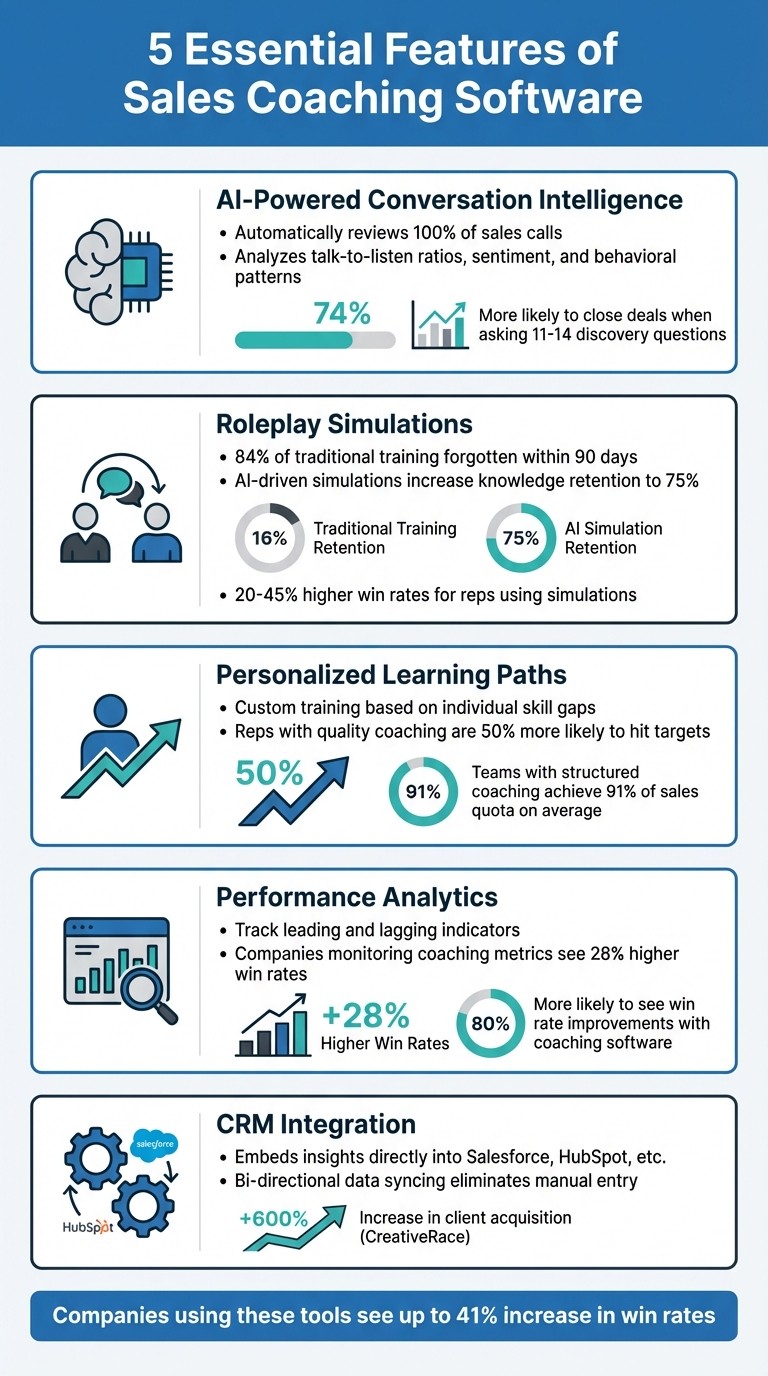
5 Essential Features of Sales Coaching Software
Sales Coaching Reimagined with Agentic AI
1. AI-Powered Conversation Intelligence
AI-powered conversation intelligence solves the challenge of limited coaching time by automatically reviewing 100% of sales calls and identifying moments where coaching can make the biggest difference.
These tools work seamlessly with platforms like Zoom and Google Meet, recording calls and using natural language processing (NLP) to transcribe them in real time. They also detect key phrases such as pricing objections, competitor mentions, and budget discussions. Instead of sifting through hours of recordings, managers receive timestamped highlights of critical moments - like when a rep missed a key discovery question or failed to address a pricing issue.
But it doesn’t stop at transcription. AI dives deeper, analyzing behavioral metrics like talk-to-listen ratios (following the 70/30 rule), speaking speed, frequency of questions, and even filler word usage. Sentiment analysis adds another layer, identifying shifts in buyer mood to flag potential risks or buying signals before they’re logged in the CRM.
Automated Analysis and Insights
AI compares sales calls to "golden calls" made by top performers, uncovering patterns that lead to success. For instance, research shows that sales reps who ask 11–14 discovery questions are 74% more likely to close deals than those who ask fewer [8]. If a rep only asks two questions while top performers average six or more, the system flags it automatically.
Claire Heskin, Chief Revenue Officer at Ronspot, shared how using conversation intelligence to refine objection handling led to a 33% boost in demo conversions.
"Conversation intelligence tools will be the single most important AI investment for sales organizations in the coming years." - Forrester [7]
These insights aren’t just for post-call reviews. Many platforms now provide real-time feedback during sales calls.
Finding Coachable Moments
AI pinpoints specific moments that need attention, such as: "At 14:32, the prospect raised a budget concern that was not addressed." This level of detail takes coaching from being subjective to being data-driven, directly connecting feedback to measurable outcomes.
Modern systems also offer live prompts during calls. For example, if a competitor is mentioned, the platform can instantly display a battlecard. If a rep’s talk-to-listen ratio exceeds 60%, the system might nudge them to ask more questions. By delivering feedback in real time, reps can adjust their approach while still in the conversation.
Leyton, a global consulting firm, used structured call reviews powered by AI to achieve 97% quota attainment for new hires and reduce ramp-up time by 15 days. By automating the process of finding coachable moments, managers can focus their time on the conversations that matter most.
2. Roleplay Simulations and Practice Environments
Here’s the issue with traditional sales training: 84% of it gets forgotten within 90 days [10]. Sales reps often sit through lectures or passive training sessions, only to struggle when faced with real objections. Roleplay simulations tackle this by giving reps a safe space to try, fail, and refine their skills before engaging with actual clients.
Modern platforms take this to the next level by using AI to create dynamic buyer personas. These personas adapt based on what the rep says, making the practice more realistic. Instead of rehearsing with a colleague who sticks to a script, reps might face a "Skeptical CFO" questioning ROI or a "Technical CTO" probing into integration specifics. Ron Baden, Head of Sales at GTM Buddy, shared an interesting example:
"When I finally met the CEO... The AI Roleplay had mimicked his objections and even his little habits so closely that he laughed and said it felt just like talking to him" [9].
The impact is clear. Reps who regularly engage in these simulations see 20-45% higher win rates [13], while knowledge retention leaps to 75%, compared to just 5% from traditional training methods [13][14]. Teams using roleplay training have reported performance gains of up to 30% [13].
Support for Different Scenarios
For roleplay simulations to be effective, they need to cover all the critical sales scenarios. For instance:
Discovery and qualification: Simulations should feature evasive personas that challenge reps to dig deeper into customer pain points instead of settling for surface-level answers [9][2].
Product demonstrations: These require practice in tailoring value propositions to specific buyer personas, ensuring benefits are communicated clearly without overwhelming prospects with unnecessary features [10][3].
Executive-level conversations: High-stakes scenarios with CxO personas - like CEOs, CFOs, and CTOs - help reps sharpen their executive presence and handle tough, direct questioning [9][11].
Customer Success teams also benefit, with simulations designed for renewals, upsells, and procurement discussions [9][12]. The key is ensuring these scenarios mirror real-world challenges.
Integration with Sales Workflows
For simulations to make a difference, they must fit seamlessly into a rep's daily routine. Just as AI-powered tools streamline post-call coaching, integrated roleplay platforms embed practice into everyday workflows. The best tools don’t require separate logins or disrupt existing processes - they work within systems like Salesforce, HubSpot, Slack, or Microsoft Teams [2][11].
This approach enables closed-loop coaching, where real deal signals trigger immediate practice opportunities. For example, when a deal moves from "Discovery" to "Proposal", the system might prompt a negotiation simulation [11][12]. Instead of practicing abstract scenarios, reps prepare for the exact call or meeting they have the next day. Quick, five-minute practice sessions before high-stakes interactions ensure skills are fresh when they’re most needed.
Platforms like Coach Pilot excel at embedding these AI-driven simulations directly into sales tools, making practice a natural part of the workflow. This way, preparation happens effortlessly, without pulling reps away from their day-to-day tasks.
3. Personalized Learning Paths and Coaching
One-size-fits-all training can be a waste of time, especially when every sales rep has different strengths and weaknesses. Personalized learning changes the game by focusing on what each individual needs to improve. Modern sales coaching tools make this possible by analyzing performance data and creating custom learning paths. For instance, if an Account Executive is great at discovery calls but struggles to close deals, the system might suggest specific negotiation training instead of revisiting basics they’ve already mastered [2].
The results speak for themselves. Reps who get high-quality coaching are 50% more likely to hit or exceed their sales targets [4]. Plus, teams with structured coaching processes typically achieve 91% of their sales quota on average [1].
The first step in creating personalized learning is to pinpoint exactly where the skill gaps are.
Skill Gap Analysis
The best coaching platforms rely on data, not guesswork. They analyze sales conversations, roleplay sessions, and assessments to identify weak spots - like poor discovery questioning, inconsistent messaging, or trouble with multithreading. This data-driven approach ensures managers focus on real performance issues rather than relying on hunches [2][5].
Skill gap analysis also allows for benchmarking. By comparing individual performance to top reps, managers can identify which behaviors drive success. For example, high-performing closers might double the number of budget-related questions they ask or follow up within 24 hours instead of waiting days [1][5].
Once gaps are identified, the next step is tracking progress to ensure improvements stick.
Progress Tracking at Scale
Effective coaching needs to be measurable. Dashboards can track everything from training completion rates to skill scores, talk-to-listen ratios, and conversion metrics - all tied directly to CRM data like win rates and deal velocity [1][2][15]. This gives leadership clear insights into how training impacts the bottom line, moving beyond basic completion stats. Tools like Coach Pilot integrate this tracking into everyday workflows, so managers can monitor progress without being pulled away from their strategic goals.
Automated scorecards also play a key role, evaluating every interaction based on established sales frameworks like MEDDIC or BANT [15][16]. A 2025 Forrester report even highlighted one company that generated $10 million in new revenue by adopting a metrics-driven coaching culture [1].
4. Performance Analytics and Reporting
Analytics take the guesswork out of coaching by turning subjective impressions into concrete, actionable data. By tracking both leading indicators (like talk-to-listen ratios) and lagging indicators (such as revenue results), organizations can make smarter decisions [18][20][22]. Here's a compelling stat: companies that monitor coaching metrics enjoy 28% higher win rates compared to those that don't [18]. And if you're using sales coaching software? You're 80% more likely to see win rates climb [21]. This structured approach to measurement lays the groundwork for pinpointing the metrics and tools that truly drive success.
Key Metrics to Track
To make the most of your analytics, focus on a few metrics with the biggest impact. These include:
Interaction quality: Monitor talk-to-listen ratios (30–40% for reps), the quality of questions asked, and how objections are handled.
Process compliance: Track the frequency of coaching sessions and the percentage of reps being coached.
Behavioral adoption: Measure how quickly coached skills are applied - ideally within 30 days [18][19].
Stick to 5–7 metrics that align with your business priorities [18]. For best results, review activity metrics weekly, skill development monthly, and performance outcomes quarterly [18][19]. To evaluate the ROI of coaching, compare the win rate improvements of coached reps against a control group of uncoached reps [19][20].
Customizable Dashboards
Once you’ve identified your key metrics, customizable dashboards make it easy to turn data into action. For example:
Executive Scorecards: These focus on big-picture outcomes like ROI and revenue growth.
Manager Coaching Boards: These highlight leading indicators, such as talk-to-listen ratios and coaching frequency [20].
The best dashboards bring together call data, pipeline stats, and revenue figures into one place. This gives managers a complete view, helping them spot trends and address coaching gaps faster [1].
Dashboards also transform individual call data into patterns, revealing recurring gaps in coaching [22]. Considering that people remember only about 50% of a conversation, these tools are invaluable for providing objective feedback [22]. Platforms like Coach Pilot take it a step further by integrating analytics into daily workflows. This allows managers to track progress and directly tie coaching efforts to pipeline health - all without juggling multiple tools.
5. CRM and Workflow Integration
Building on data-driven coaching and roleplay simulations, integrating with your CRM ensures coaching insights are immediately actionable.
Great sales coaching tools work with the systems you already use. When coaching data is embedded directly in your CRM, sales reps can focus on selling instead of juggling multiple platforms. As Momentum.io puts it:
"The best AI coaching software fits your stack, it doesn't try to replace it." [5]
Direct CRM Connections
Bi-directional data syncing is key. Modern coaching platforms automatically update CRM fields - whether you're using Salesforce, HubSpot, or another system - with AI-generated call summaries, transcripts, and action items. This eliminates the need for manual data entry [17][23].
These tools can also populate methodology-specific fields like MEDDIC or BANT by analyzing call transcripts [5]. For instance, when CreativeRace unified its sales processes with CRM-integrated insights, it saw a 600% increase in year-over-year client acquisition by improving deal tracking and follow-up consistency [4].
Accessibility Within Workflows
Integration isn't just about syncing data - it’s about embedding coaching into the tools your team already uses. Platforms that deliver real-time alerts and feedback through tools like Slack or Microsoft Teams reduce the hassle of switching between apps, making coaching a natural part of daily workflows [17]. For example, a competitor mention during a call can instantly trigger a "deal risk" alert in Slack, enabling immediate coaching [23].
This Slack-first approach allows managers to provide timestamped feedback and share resources like battlecards or process documentation directly within the CRM during active deals [6]. Coach Pilot takes this a step further by weaving AI-driven coaching insights into existing workflows, ensuring reps get guidance exactly where they need it. When coaching tools align with how your team works, adoption and results improve dramatically.
Conclusion
Effective sales coaching software revolves around five key features: AI-powered conversation intelligence to identify coachable moments automatically, roleplay simulations to boost confidence before live calls, personalized learning paths to address individual skill gaps, performance analytics to link coaching efforts with revenue, and CRM integration to embed coaching into everyday workflows.
The right software doesn’t just gather data - it drives real outcomes. For example, teams using AI-driven coaching tools report a 41% increase in win rates and a 29% boost in quota attainment. A great case study is Ronspot’s CRO, Claire Heskin, who used conversation intelligence in 2025 to enhance objection handling. This led to a 33% rise in demo conversions. Similarly, Leyton achieved 97% new hire quota attainment while reducing ramp-up time by 15 days[1].
However, technology alone isn’t the magic solution. Successful sales teams don’t just implement software - they align it with KPIs, integrate it into daily workflows, and empower managers with actionable insights[1]. A smart approach is to begin with a controlled pilot program. This allows teams to test processes, gain internal buy-in, and directly link coaching metrics to business objectives.
For maximum impact, coaching tools should fit seamlessly into the tools your team already uses. Whether it’s the CRM, Slack, or live calls, insights delivered in the right place at the right time drive adoption naturally. Tools like Coach Pilot excel at this by embedding AI-driven coaching directly into existing workflows, ensuring reps get the guidance they need exactly when they need it.
FAQs
How do I prove coaching software ROI?
To show the ROI of coaching software, zero in on measurable results like boosted sales performance, increased win rates, and reduced sales cycles. Keep an eye on key metrics such as quota attainment, deal velocity, and pipeline health both before and after the software is introduced. By quantifying these changes and tying them directly to your business objectives, you can effectively highlight the software's value and ROI.
What should I pilot test before rolling out?
Before introducing sales coaching software to your team, it's a good idea to pilot test its main features to see if it meets your needs. Pay close attention to tools like AI-driven conversation intelligence for analyzing sales calls, real-time coaching prompts, and performance tracking. Also, check how well the software handles customization - like creating role-specific coaching paths - and whether it integrates smoothly with your existing sales tools. This ensures the software fits into your workflows and enhances your coaching efforts.
How do I keep reps adopting it daily?
To encourage daily use, focus on features that actively engage users and offer instant assistance. Tools with AI-powered coaching, performance tracking, and personalized feedback are especially effective. These elements keep sales reps motivated and focused on their objectives. Incorporating AI-driven prompts into their everyday tasks promotes ongoing growth and builds a habit of regular usage.
Related Blog Posts

Remove the guesswork from winning more deals.