B2B Sales
How AI Automates Sales Email Follow-Ups
Apr 11, 2026
How AI speeds research, personalizes messages using real-time signals, times follow-ups, and integrates with CRM to boost reply rates and deals.
Sales follow-ups are critical, yet time-consuming. Research shows that 80% of sales require five or more follow-ups, but 44% of salespeople stop after just one. AI tools are transforming this process by automating tasks like research, personalization, and timing, helping sales teams save time and close more deals.
Key Takeaways:
AI saves time: Automates repetitive tasks like data entry and email drafting, freeing up over 15 hours per week.
Boosts reply rates: Personalized, signal-driven emails achieve up to 25–40% reply rates compared to 3–5% with traditional methods.
Smart timing: AI uses real-time triggers, like leadership changes or funding announcements, to send follow-ups at the right moment.
Integrated workflows: AI connects with CRMs to manage lead scores, track activity, and streamline outreach across multiple channels.
Improved outcomes: Companies using AI report higher sales velocity and win rates, with some tripling deal sizes.
AI-driven follow-ups ensure your outreach is timely, relevant, and effective, letting sales teams focus on closing deals rather than manual tasks.
Build a sales outreach AI Agent that knows when to book a meeting
How AI Automates Sales Email Follow-Ups
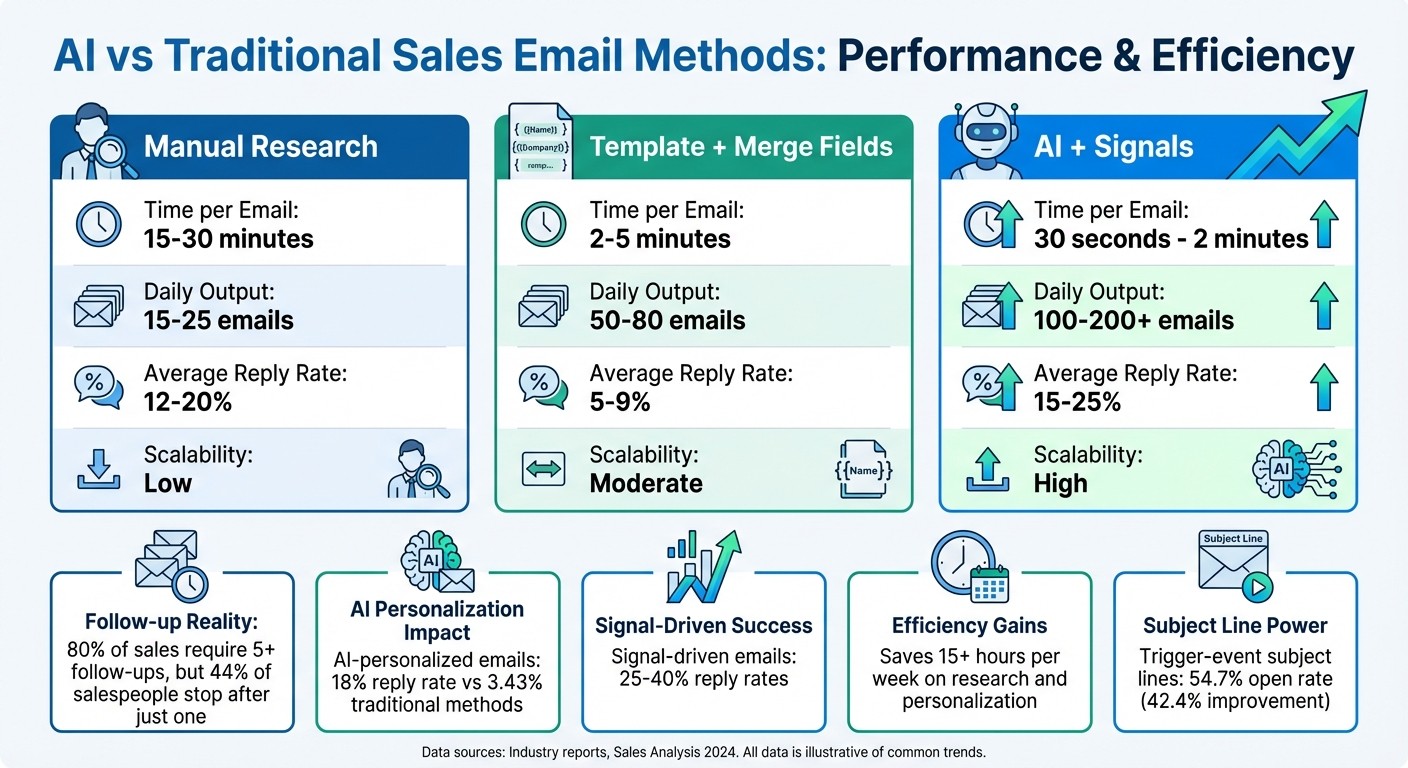
AI vs Traditional Sales Email Methods: Performance Comparison
AI-Powered Personalization at Scale
AI has turned email personalization into a game-changer, moving beyond basic merge fields like {{first_name}} or {{company}}. Instead, it uses data from sources like SEC filings, LinkedIn updates, hiring trends, and tech stack changes to craft messages that resonate with recipients. The results speak for themselves: AI-personalized emails achieve reply rates of 18%, compared to just 3.43% with traditional methods [7].
The true strength of AI lies in its ability to combine multiple data signals. For instance, referencing a recent funding round alongside a CEO’s LinkedIn post can push reply rates to an impressive 25–40% [7]. What used to take sales reps 15–30 minutes of manual research per prospect now happens in seconds, cutting research and personalization time by 90% [7]. Despite this efficiency, only 5% of sales teams currently personalize every email they send [7].
To maintain a consistent tone and avoid the robotic feel of generic automation, AI tools offer features like "Brand Kits" and "Content Hubs", ensuring emails align with your brand’s style [9][10]. The most successful sales teams use a tiered approach: they apply deep, data-driven personalization for high-value accounts while using broader, segment-level personalization for wider outreach [7].
"AI email personalization at scale means using artificial intelligence to generate unique, relevant emails for each prospect based on real data - not just inserting {{first_name}} tokens into templates."
– Autobound [7]
Once personalized messaging is in place, AI takes it further by timing follow-ups to match buyer behavior.
Behavioral Triggers and Smart Timing
Traditional follow-ups often miss the mark because they’re scheduled based on the seller’s timeline rather than the buyer’s actions. AI flips this approach by identifying key "buying windows" when prospects are most likely to engage. These insights come from both external events, like leadership changes (new executives typically allocate 70% of their budget in the first 100 days [7]), and internal signals, such as visits to pricing pages or email clicks [7].
This strategy delivers measurable results. Trigger-event subject lines see open rates of 54.7%, a 42.4% improvement over generic ones [7]. Companies like Frontify have seen real success with this method; in 2025, they implemented workflows that triggered outreach based on account activity, boosting sales velocity by 42% year-over-year and improving win rates by 35% [2]. Similarly, Cacheflow used AI-driven timing to triple their average deal size - from $5,000–$7,000 to $18,000–$20,000 - while reducing meeting prep time by 60% [2].
AI also fine-tunes follow-up timing by analyzing when individual prospects are most likely to check their email. This ensures that messages are sent at optimal times, increasing open rates [12]. Follow-up intervals adapt dynamically, with AI shortening gaps for engaged prospects and extending them for less responsive ones [12]. Instead of relying on fixed schedules like "Day 3 check-in", AI reacts to meaningful events, such as detecting a leadership change, ensuring your outreach feels timely and relevant.
"The moment we turned on Salesmotion, it became essential. No more hours on LinkedIn or Google to figure out who we're talking to. It's just there, served up to you, so it's always 'go time.'"
– Adam Wainwright, Head of Revenue, Cacheflow [2]
Beyond timing, AI simplifies workflows, allowing sales teams to focus on what matters most.
Automated Workflow Management
AI seamlessly integrates with CRM systems to handle tasks like updating lead scores and enriching prospect data. By automating these processes, sales reps save 15–20 minutes of manual research per account [13][14]. Over the course of a week, this adds up to more than 15 hours - time that can now be spent on strategic activities [14].
Workflows become smarter, triggering actions based on prospect behavior rather than rigid schedules. For example, if a prospect visits your pricing page three times in 24 hours, AI can escalate the lead to a high-priority sequence or notify the sales rep immediately [11]. Similarly, if a deal remains untouched for seven days, AI can flag the account or draft a re-engagement email tailored to the previous conversation [11].
AI also ensures consistency across multiple communication channels - email, LinkedIn, WhatsApp, and SMS - making it easier to engage buying groups that typically involve 5 to 16 stakeholders [12][14]. Currently, 54% of sales teams are using autonomous AI agents, saving sales professionals an average of 2 hours and 15 minutes per day [2].
Setting Up AI Email Automation for Your Sales Team
Choosing the Right AI-Powered Tool
When selecting an AI email tool, it's important to find one that does more than just fill in basic placeholders like {{first_name}}. Look for platforms capable of leveraging real-time signals, such as funding announcements, leadership changes, or SEC filings, to craft personalized and timely communication. The best tools don’t just track activity logs - they use engagement triggers to update deal fields like BANT or MEDDPICC, making your outreach smarter and more effective.
Another key feature to prioritize is the ability of the tool to mimic your sales team's tone and phrasing. This ensures that automated emails sound natural and authentic, even when reaching out to hundreds of prospects.
Once you've chosen a tool that fits these criteria and integrates seamlessly with your systems, the next step is to set up targeted email sequences as part of your B2B sales playbook.
Configuring Email Sequences
Before launching AI-driven email campaigns, make sure your CRM is up-to-date with essential data, such as lead sources, personas, and the most recent touchpoints [6]. Additionally, configure SPF, DKIM, and DMARC records to safeguard your sender reputation [16].
Start by warming up your email inboxes for 14–30 days to build a solid sender reputation [16]. Gradually increase the email volume over about three weeks, beginning with around 20 emails per day and capping at roughly 30 campaign emails per inbox daily. This method helps ensure long-term deliverability [16].
When structuring your email sequences, aim for 4–7 touchpoints, spaced 2–4 business days apart [16]. Advanced AI tools can adjust these intervals dynamically, responding to engagement levels - shortening gaps for active prospects and lengthening them for those less responsive. Keep your emails concise, ideally under 150 words, and make sure each follow-up provides clear value. For example, include a case study or an ROI calculator instead of simply "checking in" [1]. Using "spin syntax" (e.g., {Hi|Hello|Hey}) can add variety to your phrasing and help avoid spam filters.
"A high-performing email sequence is an operations problem, not a writing problem."
– Hans Dekker, Instantly [16]
Finally, configure your AI to automatically categorize incoming replies - whether they're interested, raising objections, or simply out-of-office. This setup can trigger the right next steps, such as sending a pricing breakdown or scheduling a meeting [15][16].
With your sequences fine-tuned, the next step is to integrate AI into your broader sales workflow.
Integrating AI with Your Current Sales Workflows
To make AI work seamlessly with your current processes, use your CRM as the central hub for all engagement data. This approach prevents duplicate emails and ensures your AI models stay accurate by syncing data based on meaningful engagement triggers [6][16]. This unified system enhances AI’s ability to deliver personalized and timely follow-ups.
Context-aware automation can take your follow-ups to the next level. For instance, tools like Sybill can analyze sales calls and use the conversation context to draft follow-up emails or automatically update CRM fields like MEDDPICC or BANT [18]. A great example comes from 2025, when a sales team used Dock's AI to extract insights from Gong call recordings, creating tailored business cases for prospects. This strategy led to a 25% increase in late-stage win rates year over year [19].
When integrating AI, take it step by step: define your goals, verify data fields, set triggers, configure AI logic, and test the system on a small segment [19]. For example, in 2025, Pynest implemented AI agents that analyzed job postings and publications to streamline lead screening. This reduced initial lead screening time by 32% and boosted pipeline velocity by about 22% [19].
While AI can handle many tasks, keep human oversight in place for critical areas like negotiations and relationship building [17].
Monitoring and Optimizing AI-Driven Email Campaigns
Tracking Key Metrics for Success
When it comes to AI-driven email campaigns, reply rates and meetings booked are the most important metrics to watch. They directly contribute to pipeline growth [20][21]. Pay close attention to each step in your email sequence. For instance, if reply rates drop significantly at Step 3, it’s a clear sign that message needs improvement [20]. On average, B2B email campaigns see open rates around 19.2% and click-through rates near 3.18%, but the best-performing campaigns surpass 30% open rates and achieve reply rates over 15% [20].
Keeping an eye on deliverability metrics is equally critical. Aim to keep hard bounce rates below 2% and spam complaint rates under 0.3% - this helps maintain a strong sender reputation [20][21]. If you notice a sudden drop in open rates, it’s likely your emails are being flagged as spam instead of reaching the primary inbox [20][21]. Be cautious with follow-ups; the fourth follow-up often results in a spike in unsubscribe and spam complaint rates. Striking the right balance between persistence and frequency is key [20].
These metrics form the foundation for leveraging AI to fine-tune and improve your campaign outcomes.
Using AI Insights to Improve Campaign Performance
AI tools can take your email campaigns to the next level by providing actionable insights. For example, sentiment analysis can categorize responses as "Interested", "Meeting Booked", or "Not Interested", helping you calculate a more precise positive reply rate [20]. This allows you to focus on higher-quality leads.
AI can also identify behavioral triggers to refine your approach. If engagement drops, it might suggest switching tactics - like moving from email to LinkedIn or phone calls to re-engage prospects [1][22]. Metrics like "Reply Latency" (time between sending and receiving a response) and "Time to Completion" (from first touch to booking a meeting) help you measure whether these adjustments are effectively shortening your sales cycle [20].
To understand what’s driving results, use last-touch attribution to link closed deals to the specific email step that generated the reply. This reveals which parts of your sequence are contributing most to revenue. For example, if one step consistently leads to meetings, you know that message resonates and can replicate its success [20].
By tapping into these insights, you can continuously refine your email campaigns for better results.
Continuous Refinement of Email Strategies
To keep your campaigns sharp, form a review team with 3–5 members from sales, marketing, and revenue operations. Meet weekly to assess AI-generated messaging and identify what’s working best. This ensures the future of sales enablement and automation doesn’t run unchecked [5].
Run A/Z tests to quickly determine which subject lines, openings, and calls-to-action (CTAs) perform best [21][20]. It’s also vital to monitor sequence completion rates to ensure your automation software is functioning properly and isn’t cutting sequences short due to technical glitches [17].
Refine your AI prompts based on which messages generate the highest response rates [1]. For follow-ups that aren’t getting traction, try a "pattern interrupt" approach - like asking, "Did you give up on [problem]?" - to reignite interest [22]. Regular testing and prompt adjustments help keep your outreach fresh and effective.
Best Practices for AI-Driven Sales Email Follow-Ups
Building on the workflows and timing strategies we’ve already covered, these tips will help ensure your follow-ups are both tailored and compliant.
Balancing Automation and Personalization
One of the most common pitfalls with AI in sales is overly generic outreach. Data shows that AI-personalized emails see an 18% reply rate, far surpassing the performance of generic templates [7]. The secret? Focus on signal-based personalization - referencing dynamic triggers like recent activity or specific pain points instead of just dropping in a company name [7].
For high-value accounts, take it a step further. Always have a human review AI-generated drafts to refine tone and ensure they reflect your brand’s unique voice [3][5]. As Ameya Deshmukh from EverWorker aptly puts it:
"Personalization is a capacity problem disguised as a copywriting problem"
– Ameya Deshmukh, EverWorker [10]
A tiered approach works best here. For Tier 1 strategic accounts, use deep, multi-signal personalization, which can boost reply rates to an impressive 25–40% [7]. For broader audiences, segment-level AI personalization is more practical [7][10]. Keep your emails concise - between 50 and 125 words - and focus on two or three key elements to avoid overwhelming the recipient [7][3].
Once you’ve nailed personalization, it’s equally important to ensure your outreach complies with legal standards.
Ensuring Compliance with Email Regulations
AI can send emails at scale, but mistakes in compliance can escalate quickly. For example, violations of CAN-SPAM can cost over $51,000 per email, while CASL fines in Canada can go up to $10,000,000 [23]. To stay on the right side of the law, every AI-generated email must include accurate "From" details, a physical mailing address, and a clear unsubscribe option [23][1].
Your AI tools should also be configured to automatically honor opt-out requests within 10 business days for U.S. contacts - or even faster for EU and Canadian recipients [23]. For European outreach, ensure you can document a "legitimate interest" basis under GDPR guidelines [23]. Additionally, your CRM should flag consent status and restrict AI access to approved data fields only [6].
Preference centers are another smart move. Instead of a simple unsubscribe link, let recipients choose how often they hear from you or what types of content they receive. This keeps them engaged while respecting their preferences. And don’t forget: your AI should pause email sequences immediately after detecting a reply to avoid redundant or intrusive messages [5][1].
With compliance and personalization in place, you can take your strategy to the next level using tools like Coach Pilot.
Using Coach Pilot for Better Sales Enablement
Coach Pilot (https://coachpilot.com) is designed to help your team communicate effectively at every stage. By creating custom sales playbooks, the platform ensures your AI operates within a solid framework - using approved messaging, case studies, and objection-handling snippets to prevent errors or misrepresentation [10].
The tool goes beyond email automation. Its real-time coaching feature integrates directly into your workflows, suggesting the "Next Best Action" based on a prospect’s behavior and where they are in the sales process [1]. This means your team isn’t just automating emails - they’re automating the right emails at the right time.
Coach Pilot also offers weekly live coaching calls and immersive training sessions, equipping sales reps to fine-tune AI-generated content and add that crucial human touch.
Conclusion
Key Takeaways from AI Email Automation
AI-powered email automation is changing the way sales teams operate, especially when it comes to follow-ups. By automating tasks like data entry and template creation, sales reps can focus more on building relationships and closing deals. The stats are clear: personalized emails can generate response rates six times higher than generic ones, and following up within an hour of a call can lead to 40% higher reply rates [3][4].
Switching from a calendar-based approach to a signal-driven strategy ensures your outreach is timely and relevant. Whether it’s a new executive hire, a recent funding announcement, or a strategic move highlighted in an earnings call, this method aligns your communication with what’s happening in your prospect’s world [2]. The results speak volumes - companies like Frontify saw a 42% boost in sales velocity and a 35% increase in win rates after adopting signal-based workflows in 2025/2026 [2].
Next Steps to Implement AI for Your Sales Team
Start by auditing your current process. Identify 3–5 key triggers that resonate most with your Ideal Customer Profile, and test AI-driven follow-ups after sales calls [8]. This small adjustment can significantly impact deal progress, especially since follow-ups are often overlooked when reps are swamped [4].
To make it work, connect your AI tools to reliable data sources like your CRM, LinkedIn activity, and other platforms. This ensures your personalization efforts are based on real-time insights rather than outdated templates [5][8]. Run pilot campaigns, measure the outcomes, and expand on what works [8].
Platforms like Coach Pilot (https://coachpilot.com) make this process easier by embedding AI-driven coaching into your sales workflows. With features like custom playbooks and real-time guidance, your team can send not just automated emails, but smarter, more effective emails. By incorporating AI, you’re not just streamlining outreach - you’re elevating the entire sales process.
FAQs
What data does AI use to personalize follow-up emails?
AI draws on data like prospect behavior, buying signals (such as SEC filings, hiring patterns, and social media activity), and details from sales interactions, including call transcripts and CRM records. With this information, it crafts personalized follow-up emails designed to connect with prospects on a deeper level.
How do I set up trigger-based follow-ups without hurting deliverability?
To create trigger-based follow-ups while protecting your email deliverability, you need to prioritize quality controls, compliance measures, and smart timing strategies. Start by keeping your CRM clean and well-organized. Use behavioral triggers that respond to specific actions taken by your prospects, ensuring your messages are timely and relevant.
Incorporate safeguards to prevent irrelevant or excessive emails, maintaining compliance with regulations like CAN-SPAM or GDPR. Signal-driven automation - emails triggered by genuine buying signals rather than a fixed schedule - can help your messages stay relevant. This approach not only reduces the risk of being marked as spam but also improves your chances of landing in the inbox.
How can I keep AI follow-ups compliant with CAN-SPAM and GDPR?
When it comes to staying compliant with CAN-SPAM and GDPR, there are a few essential rules to follow.
For GDPR, make sure you're working with verified data and only contacting individuals who have given explicit consent. Always respect unsubscribe requests and use automated suppression lists to ensure you're not accidentally emailing someone who opted out.
For CAN-SPAM, it's crucial to include clear opt-out options in your emails and process unsubscribe requests quickly. Tools equipped with features like global block lists and reply management systems can make it easier to stay compliant while scaling your outreach efforts.
Related Blog Posts

Remove the guesswork from winning more deals.