B2B Sales
How AI Logs Sales Pipeline Activities Automatically
Apr 24, 2026
AI captures emails, calls, and meetings to auto-update CRMs, boost forecast accuracy, and free sales reps from admin.
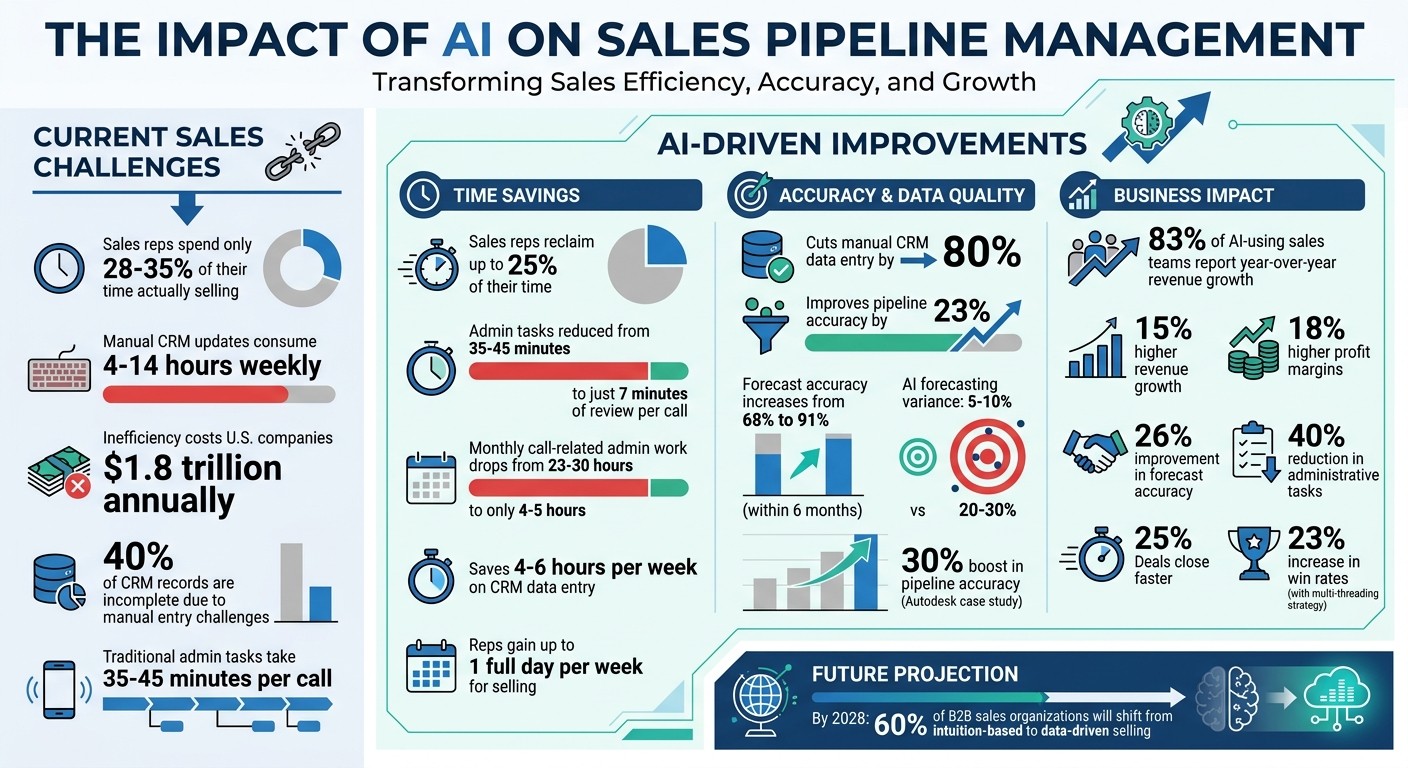
AI transforms sales pipeline management by automating CRM data entry, saving time, and improving data accuracy. AI sales coaching helps teams overcome these challenges, as sales reps spend only 28%-35% of their time selling, while manual CRM updates consume 4-14 hours weekly. This inefficiency costs U.S. companies $1.8 trillion annually. AI-powered tools eliminate this burden by:
Automating CRM updates: AI captures data from emails, calls, and meetings in real time, ensuring accurate, up-to-date records.
Saving time: Sales reps reclaim up to 25% of their time, reducing admin tasks from 35-45 minutes per call to just 7 minutes of review.
Improving forecast accuracy: AI-driven insights boost accuracy from 68% to 91%, enabling better decision-making.
Enhancing productivity: Companies using AI report 83% year-over-year revenue growth and 15% higher revenue.
AI tools integrate with platforms like Salesforce and HubSpot, sync with communication tools, and use NLP to extract key details, such as budgets or timelines. They also create follow-up tasks and draft emails, letting sales teams focus on closing deals. With AI, businesses gain reliable data, streamlined operations, and stronger sales performance.
AI Sales Pipeline Automation: Key Statistics and ROI Impact
How to Boost Your Sales With AI Automation? (Complete Guide, 2025)
How AI Automates Sales Pipeline Activity Logging
AI has stepped in to tackle the inefficiencies of manual CRM entry by seamlessly integrating with tools like Gmail, Outlook, Zoom, Microsoft Teams, and Slack through secure OAuth authentication [8]. Once connected, it monitors sales interactions in real time, pulling data from emails, calendar events, video calls, and messaging platforms. This real-time tracking allows AI to use Natural Language Processing (NLP) to extract and organize essential details.
For instance, when a prospect says, "our budget is around $50,000" or "we need this implemented by Q3", the AI picks up on these details and maps them to relevant CRM fields like deal value, expected close date, or timeline constraints [9]. This ensures that no critical information is lost or forgotten.
Real-Time Data Capture with AI
Modern AI systems can even join video calls as silent observers, transcribing and analyzing conversations. Some platforms offer a "Silent Co-Pilot" feature, where the AI listens in without interrupting the flow of the meeting [9].
"The AI co-pilot is invisible to both the customer and the manager. The customer never hears it. The manager does not need to interact with it. It works silently in the background, and when the call ends, the work is done." – Justas Butkus, Founder & CEO, AInora [9]
AI also scans email signatures and calendar invites to automatically create or update contact records. It enriches these records by pulling in additional details like LinkedIn profiles and job titles. For example, if a new stakeholder is introduced in an email thread, the AI adds them to your CRM with complete contact information, saving time and effort.
Automatic CRM Record Updates
Once the data is captured, the AI syncs it directly to platforms like Salesforce, HubSpot, or Pipedrive, eliminating the need for manual updates [8]. It organizes the information based on your sales methodology, whether that's BANT (Budget, Authority, Need, Timeline), MEDDIC, or SPICED.
Beyond just logging data, the AI identifies commitments made during calls and creates follow-up tasks with deadlines in real time [8]. It can even draft follow-up emails in the sales rep's tone based on call transcripts, while still allowing for human review to fine-tune personalization.
This automation ensures CRM records are updated immediately after a call, removing the typical 10–15 minutes spent on manual data entry [9]. With nearly 40% of CRM records often incomplete due to manual entry challenges [9], this technology ensures every interaction is fully documented and instantly accessible to the entire sales team. Next, you'll discover how to integrate these tools with your CRM for smooth, efficient operations.
Steps to Set Up AI-Powered Activity Logging
Getting AI-powered logging up and running involves three main steps: linking your AI tool to your CRM, connecting communication channels, and thoroughly testing the setup before rolling it out to your team.
Connect AI with Your CRM
Start by securely connecting your AI tool to your CRM. Modern CRMs like HubSpot, Salesforce, and Pipedrive typically support API integration for this purpose. To do this, you'll need to create authentication credentials - HubSpot refers to this as a "Private App", while Salesforce uses the term "Connected App" [10].
During setup, make sure you configure the correct permission scopes. For example, permissions like crm.objects.contacts.write or activities.write allow the AI to log data while safeguarding sensitive information. Companies that integrate AI with their CRM report a 40% reduction in administrative tasks and close deals 25% faster [10].
To keep things secure, store API keys in environment variables instead of hardcoding them. This not only enhances security by preventing vulnerabilities but also makes it easier to rotate credentials when needed. It's also a good idea to create a dedicated "Integration User" in your CRM for the AI tool. This ensures a clear audit trail for all activities logged by the system.
"An AI agent running without CRM access is like a sales rep who's never seen your customer database. It doesn't know who's already a customer or what deals are in progress." – SlashDev [11]
Before connecting your AI tool, clean up your data. Remove duplicate contacts and standardize company names to prevent creating unnecessary duplicate records. Poor data quality is a major pitfall - 40% of CRM-AI integration projects fail due to unclean data [12]. As John V. Akgul, Founder & CEO of PxlPeak, puts it: "Garbage-in-garbage-out is not a cliché - it's the primary failure mode for AI CRM integrations" [12].
Once your CRM is ready, the next step is to connect your communication tools to create a seamless data flow.
Set Up Email, Calendar, and Call Tracking
Integrating your email, calendar, and call tracking systems ensures real-time data capture. Start by connecting your email platform, such as Gmail or Outlook. Then, sync your calendar so the AI can monitor meeting invites, attendees, and scheduled activities to automatically create or update contact records in your CRM. These integrations ensure every interaction is logged and your pipeline stays up-to-date.
For call tracking, link your transcription or recording tools, like Fireflies.ai ($19/user/month) or Otter.ai ($20/user/month), using webhooks. Real-time triggers allow the AI to process events - like a contact replying to an email or a new lead entering the system - within 2–8 seconds [11]. For tasks that aren't time-sensitive, such as lead scoring updates, batch processing can be scheduled to run every 15 minutes, balancing performance with cost.
Start small by focusing on one workflow, such as email logging. Feed the AI historical data to fine-tune its tagging models and monitor its accuracy for about a week before expanding to other channels.
Test and Adjust the System
Once your CRM and communication tools are integrated, it's time to test the system. Use simulated data to verify that webhook triggers and data flows are working as expected [13]. Review AI-generated outputs - like call summaries, email drafts, and lead scores - to ensure they are accurate and appropriately worded [13].
Be mindful of API rate limits to avoid integration issues. For example, HubSpot allows 100 requests every 10 seconds, while Salesforce Enterprise permits 100,000 calls per 24 hours [11]. To handle traffic spikes, set up an event queue (using tools like Redis or SQS) between your webhook receiver and the AI agent. Ignoring rate limits is one of the leading causes of CRM integration failures [11].
Set up automated alerts to notify your team if the error rate exceeds 5% within a 10-minute window. Also, establish a conflict resolution strategy, such as "last write wins", to manage situations where both a human and the AI try to update the same record simultaneously [11].
Consider starting with a "Draft" or "Assist" mode, where the AI logs activities as drafts for human review. This approach allows your team to build trust in the system while fine-tuning its accuracy. Once the AI consistently delivers accurate results and your team feels confident, you can transition to full automation to maximize efficiency.
Platforms like Coach Pilot streamline these steps, integrating them into the future of sales enablement. This ensures accurate, real-time sales pipeline logging without disrupting your workflow.
Benefits of AI-Driven Activity Logging for Sales Teams
When an AI-powered logging system is in place, the advantages quickly become apparent. Sales teams gain access to more reliable data while reclaiming valuable time previously spent on manual data entry. These improvements not only streamline day-to-day operations but also create opportunities for stronger overall sales performance.
Better Data Accuracy and Fewer Errors
AI-driven logging systems excel at capturing data in real time, ensuring your CRM is always populated with accurate information. Instead of relying on sales reps to recall and manually record every interaction, AI pulls data directly from emails, calls, and meetings. This creates a consistent and dependable foundation for making smarter sales decisions.
The stats speak for themselves: AI-powered data capture cuts manual CRM data entry by 80% and improves pipeline accuracy by 23%[1]. For example, Autodesk implemented Salesforce Einstein Activity Capture in 2021, which automatically logged emails and meetings from reps’ inboxes. The result? A 30% boost in pipeline accuracy, an 18% increase in deal close rates, and thousands of hours saved on administrative tasks[2].
AI also eliminates the guesswork in deal assessments by introducing behavioral scoring. Instead of relying on subjective judgments or overly optimistic timelines, AI evaluates engagement signals like email response times and stakeholder involvement. For instance, a professional services firm with 40 consultants discovered that deals involving three or more stakeholder meetings within the first 30 days closed at three times the rate of others. Adjusting their approach to focus on multi-threading led to a 23% increase in win rates[4].
"AI tools are only as good as the data they have access to. Most enterprises still rely on humans to connect their sales processes and CRM... as a result, data in most CRMs is incomplete and unreliable." – Backstory (formerly People.ai)[6]
Increased Efficiency and Productivity
Sales reps spend just 28% to 35.2% of their week on actual selling, with the rest eaten up by administrative tasks like data entry[14][2]. AI automation can save each rep up to a full day per week, freeing them to focus on what they do best - selling[15].
The time savings are substantial. Tasks that used to take 35–45 minutes per call for admin work can now be reduced to just 7 minutes of review. This change slashes monthly call-related admin work from 23–30 hours to only 4–5 hours[3]. Overall, AI-powered activity capture increases the time spent selling by 25%[2].
"Sales reps were never meant to be data clerks. They're closers. They're negotiators. They're relationship-builders." – Articsledge[2]
AI’s impact goes beyond individual productivity. Companies using AI for activity tracking report a 26% improvement in forecast accuracy[2]. For example, a tech company with a 250-person sales team improved its forecast accuracy from 68% to 91% within six months, allowing leadership to predict quarterly revenue within a 5% margin[4].
The benefits ripple across the organization. 83% of sales teams using AI reported year-over-year revenue growth[16]. Additionally, businesses with strong pipeline visibility powered by AI see 15% higher revenue growth and 18% higher profit margins[4]. By 2028, it’s projected that 60% of B2B sales organizations will shift from intuition-based to data-driven selling[14].
With these advantages, platforms like Coach Pilot ensure your sales team stays focused on closing deals while maintaining accurate, up-to-date data.
Measuring the Impact of AI on Sales Pipeline Management
To understand how AI influences sales pipeline management, focus on tracking clear metrics that highlight ROI and reveal areas for improvement.
Key Metrics to Track
One of the most immediate benefits of AI is time savings. Measure how many hours your sales reps reclaim from manual tasks like data entry. Sales reps often spend over 25 hours a week on administrative work[2]. Cutting this time frees them to focus on selling. For example, if your team’s hourly loaded cost is $75 (based on a $150,000 annual salary), you can calculate the dollar value of these reclaimed hours[19].
Another critical metric is pipeline velocity, which combines factors like qualified opportunities, win rates, average deal size, and sales cycle length into a single diagnostic figure. For instance, a SaaS team improved their monthly forecast accuracy from ±30% to ±11% in just two months by implementing activity-based deal scoring. In one case, the AI correctly predicted a lower-than-expected close total of $78,000 compared to a manually forecasted $120,000, and the actual number landed within $5,000 of the AI prediction[7].
Forecast accuracy is another area where AI shines. AI-based forecasting typically achieves a variance of 5% to 10%, compared to the 20% to 30% variance seen with manual methods[4]. Additionally, track engagement quality metrics, such as the number of stakeholders involved (contact depth) and the speed of follow-ups.
"The question for a Head of Sales isn't 'if' AI moves the numbers; it's 'which metrics move first, how much, and how do we prove it?'" – Ameya Deshmukh, EverWorker[18]
These metrics not only help demonstrate ROI but also provide insights for fine-tuning your AI system. Next, let’s explore how AI analytics can drive continuous improvement.
Using AI Analytics for Ongoing Improvement
AI analytics take these metrics a step further by enabling continuous adjustments to your sales strategies. As deals close - whether won or lost - the system refines its predictive models, identifying patterns that might go unnoticed with manual analysis[4]. For example, set up automated alerts for deals with no activity logged for 8 to 12 days, as this often signals a deal at risk[7].
Behavioral deal scoring is another powerful tool. It moves beyond gut feelings to provide data-driven insights. A professional services firm, for instance, found that deals involving three or more stakeholder meetings within the first 30 days closed at three times the rate of others. By adjusting their process to prioritize multi-threaded engagement, they boosted their win rates by 23%[4]. Similarly, a manufacturing company used AI to analyze data from platforms like Zoom, email, and their CRM. They discovered that deals stalling during technical evaluations often faced hidden procurement issues. Addressing these blockers early led to an 18% increase in their close rate[4].
To implement AI effectively, consider a 90-day pilot approach. Use the first 30 days to clean your data and establish baselines, the next 30 days to compare AI forecasts against manual ones, and the final 30 days for full adoption[17]. Allow managers to override AI scores for up to 10% of deals, but require documentation of these decisions. This creates an opportunity to evaluate whether human intuition or AI predictions are more accurate over time[17].
"True pipeline visibility isn't just about seeing what's in your pipeline today. It's about understanding where deals are really headed." – Sybill[4]
To turn these insights into action, tools like Coach Pilot integrate AI-driven coaching directly into sales workflows. By providing real-time guidance based on activity patterns and deal health signals, your team can proactively address risks before they derail opportunities.
Conclusion
AI-driven logging is reshaping how sales teams manage their pipelines, making processes faster, smarter, and more efficient.
By automating activity logging, sales reps can reclaim up to 25% of their time previously spent on manual tasks[5], along with saving 4 to 6 hours a week on CRM data entry[1]. The results? Companies leveraging AI for sales automation report an impressive 83% year-over-year revenue growth[16] and see forecast accuracy jump from 68% to 91% in just six months[4].
But it’s not just about saving time. AI ensures complete data accuracy by capturing every interaction - emails, calls, meetings - in real time[1]. This eliminates the guesswork and ensures your team operates with a reliable, up-to-date single source of truth. These improvements in data quality lead to measurable results: companies with clear pipeline visibility experience 15% higher revenue growth and 18% higher profit margins compared to those relying on manual processes[4].
"Sales automation reduces cost and frees seller capacity when humans and automation work together." – McKinsey[16]
With AI taking care of administrative burdens, sales reps can focus on what they do best - building relationships and closing deals. Automated systems identify stalled opportunities before they’re lost and use behavioral scoring to pinpoint the factors that determine success. This allows teams to engage in more strategic, multi-threaded deal management.
If you’re looking to bridge the gap between strategy and execution, Coach Pilot offers a solution. By integrating AI-driven coaching, custom sales playbooks, real-time guidance, and automated logging into your workflows, it helps boost win rates, accelerate sales cycles, and improve forecast accuracy.
FAQs
Is my customer data secure when AI logs emails and calls?
Customer data stays protected when AI logs emails and calls, provided that vendors implement strong security measures. These measures typically include encryption, strict access controls, and adherence to recognized standards like SOC 2 or ISO 27001. By ensuring these protocols are in place, businesses can uphold data privacy and safeguard sensitive information effectively.
How do I stop AI from creating duplicate contacts or incorrect updates?
To keep your CRM data clean and reliable, leverage AI-powered deduplication and data hygiene tools. These tools can identify duplicate records, verify their accuracy, and merge them seamlessly, ensuring your database stays accurate.
On top of that, implement automated pipeline hygiene checks. These checks help flag outdated or incorrect data, prompting timely updates to keep your records fresh. When combined with proper CRM integration and data cleanup processes, you can significantly reduce errors and maintain trustworthy records.
What should I measure to prove ROI from AI activity logging?
To show the ROI of AI activity logging, focus on tracking important metrics such as pipeline velocity, forecast accuracy, deal progression, and pipeline hygiene. These metrics offer a clear picture of how automation improves the efficiency of your sales process and the outcomes it delivers.
Related Blog Posts

Remove the guesswork from winning more deals.