B2B Sales
How Automated Approvals Shorten Sales Cycles
Apr 14, 2026
Automate approvals and use AI to cut deal approval times, reduce admin work, and improve sales forecasting.
Automating approvals can drastically reduce sales cycle delays, especially during the negotiation-to-close phase, which accounts for 35–40% of the cycle. Manual processes, like sequential reviews and email-based approvals, slow deals by weeks and cost businesses up to 9% of annual revenue. With automation, approvals happen faster - sometimes in hours instead of days - while improving visibility, reducing administrative tasks, and ensuring smoother deal progression.
Key takeaways:
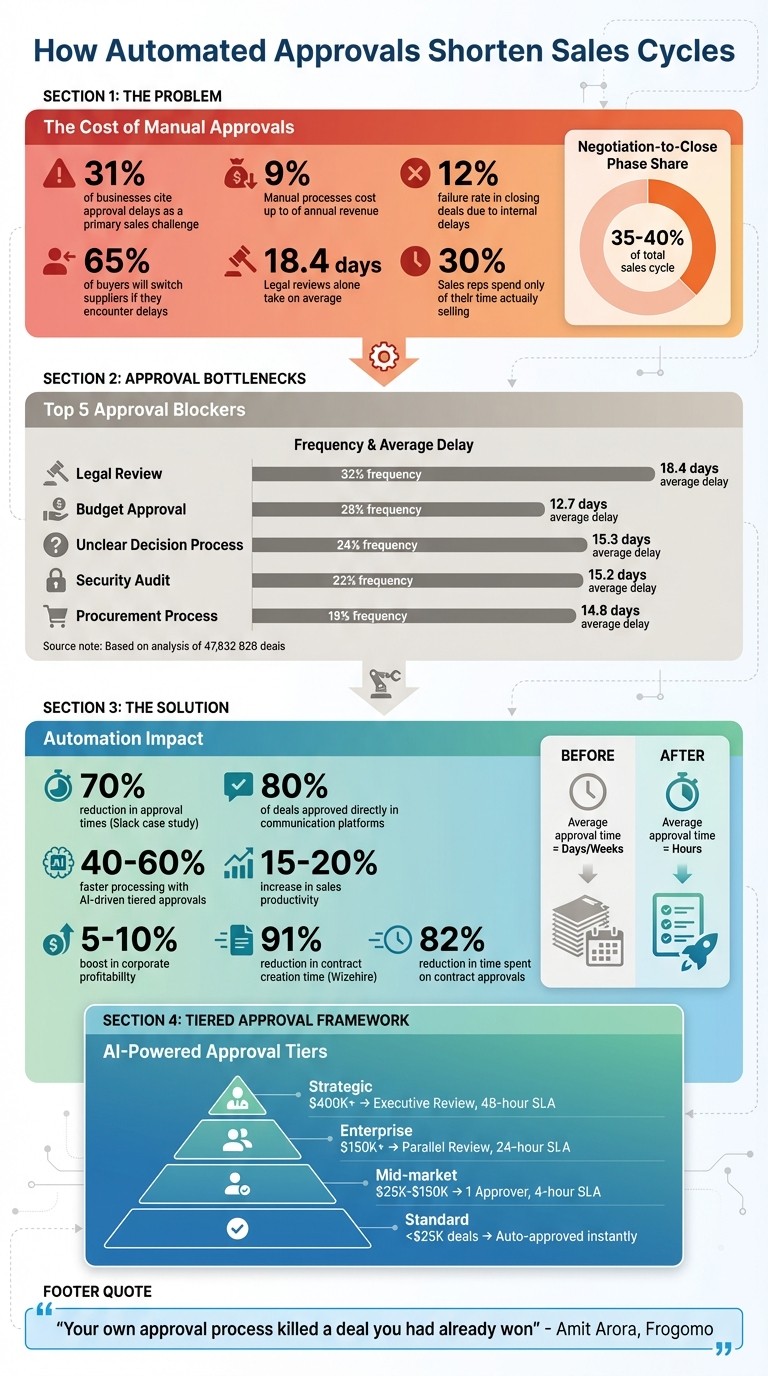
Manual approvals waste time: 31% of businesses cite delays as a major sales challenge, with legal reviews alone averaging 18.4 days.
Automation speeds up approvals: Systems like Slack’s "Approvals Bot" cut approval times by 70%.
AI optimizes processes: AI auto-approves low-risk deals, prioritizes complex ones, and enhances decision-making with predictive insights.
Results: Shorter sales cycles, higher productivity, and better forecasting accuracy.
Automating approvals ensures deals move quickly, keeping customers happy and competitors at bay.
Impact of Manual Approvals on Sales Cycles: Key Statistics and Solutions
Automated Sales Quote Approval Workflow for Faster Deal Closure: Automate Your Business Processes
The Problem: Manual Approvals Slow Down Sales
Manual approval workflows are a major hurdle in the sales process. Multi-level reviews often lead to significant delays. The numbers don’t lie: 31.33% of businesses cite approval delays as a primary challenge in their sales process [10], and these inefficiencies can cost up to 9% of annual revenue [3].
Even more alarming, a 12% failure rate in closing deals highlights how crucial fast internal approvals are [2]. While your team waits for signatures, competitors are swooping in and closing deals. In fact, 65% of buyers will switch suppliers if they encounter delays or obstacles during their purchase journey [2].
Finding Approval Bottlenecks
One of the biggest culprits is sequential routing - where each stakeholder reviews deals one after another. This approach can triple the time required for approvals. For instance, legal reviews alone take an average of 18.4 days per deal [9]. Add in finance and executive sign-offs, and weeks can vanish.
Another issue is single-point-of-failure approvers. When a key decision-maker, like a VP, is on vacation or overwhelmed, deals grind to a halt. Manual systems often lack features like automatic delegation or backup routing, leaving contracts stuck. For example, Slack’s sales operations team faced 11-day approval cycles that were costing them deals. To tackle this, Senior Manager Kiona Davies and Architect Monica Wilkinson created an "Approvals Bot" that shifted the process into Slack. The result? 80% of deals were approved directly in Slack, cutting approval times by 70% [2][1].
Lack of visibility is another major problem. Approval requests often get buried in overflowing email inboxes, leading to what’s commonly called "sales limbo." Without a central dashboard, neither reps nor managers know where deals are stuck. Many companies also treat low-value, routine deals the same as high-stakes enterprise contracts, adding unnecessary delays for straightforward transactions.
Source: Analysis of 47,832 B2B deals (2025 Q1-Q3) [9]
This table shows how extended reviews - whether legal, financial, or procedural - directly stretch sales cycles. These delays don’t just affect individual deals; they ripple out to impact overall sales performance and enablement.
Measuring the Cost of Delays
Sales reps spend only 30% of their time selling, while the rest is eaten up by administrative tasks like chasing approvals [3]. This lost productivity has a direct impact on revenue.
Forecasting becomes another casualty. 43% of sales leaders report longer sales cycles [12], and over 50% of companies have seen sales cycle durations increase by more than 50% [11]. When every deal takes a different, unpredictable path through manual approvals, creating accurate revenue and cash flow forecasts becomes nearly impossible.
The negotiation-to-close stage - where most approvals occur - accounts for 35-40% of the total enterprise sales cycle [2]. For the average B2B deal, which takes 84 days, that’s about 30 days spent waiting. Amit Arora from Frogomo sums it up perfectly:
"Your own approval process killed a deal you had already won" [2].
When buyers encounter delays on your side, they don’t stick around - they move on to faster competitors.
How Automated Document Approval Workflows Work
Automated workflows tackle the delays and inefficiencies of manual approval processes head-on. Instead of relying on emails and manual handoffs that slow deals, automation ensures every step flows smoothly.
Here’s how it works: the process kicks off in your CRM - whether it’s Salesforce, HubSpot, or a similar platform. When a sales rep submits a deal for approval, the system automatically pulls key details like discounts, payment terms, and customer history to populate the request [13][14]. This eliminates the need for tedious copy-pasting.
From there, intelligent routing steps in. Based on pre-set business rules - like deal size or risk level - the system determines which stakeholders need to review the deal, whether it’s Finance, Legal, or the Sales VP. This removes bottlenecks caused by manual handoffs [13][4]. Plus, modern systems support parallel approvals, meaning multiple departments can review the document simultaneously, cutting approval times by as much as two-thirds [2].
The approval process also moves out of scattered email threads into centralized platforms. These might be virtual deal rooms or tools like Slack and Teams, where stakeholders can approve with just one click [13][2]. If someone is unavailable or misses their SLA, the system automatically reassigns the task to a delegate or escalates it to a manager [3][2]. No more waiting for someone to return from vacation to move the deal forward.
Core Features of Automated Approvals
Several key features make these workflows so efficient. At the heart of it all is workflow automation, which handles repetitive tasks. For example, if a deal includes a discount over 15%, the system automatically triggers the right approval path - no manual intervention required. Real-time notifications ensure that approvers are alerted immediately, whether through Slack, Teams, or SMS [1][2][4].
Another critical feature is CRM integration. These systems sync directly with platforms like Salesforce or HubSpot, auto-filling templates and reducing errors while keeping revenue recognition aligned [7][17][4]. Christopher Ginty, Director of Revenue Operations at RemoFirst, explains:
"Instead of our reps spending time manually creating contracts, they just pull up a standardized template and send it out in minutes. Everything is synced with HubSpot" [4].
At AeroNet, Chief Software Engineer Jean Pagan reported an 80% reduction in contract creation time after implementing automated workflows. Sales reps who used to spend 10–12 minutes per customer now finish the process in just two minutes, thanks to automated adjustments [17].
Parallel processing is another game-changer. With this feature and enforced SLAs, approval times drop significantly - what once took three days now takes just one [2]. For mid-market deals, if an approver doesn’t respond within four hours, or 24 hours for enterprise deals, the system escalates or reroutes the request automatically [2].
How AI Optimizes Approvals
AI takes automation to the next level by distinguishing between deals that need human attention and those that can be approved automatically. Using tiered logic, the system classifies approvals as Rule-Based, Judgment-Based, or Hybrid [2].
For straightforward deals - like those under $25K with standard payment terms and discounts below 15% - AI can auto-approve instantly. This allows human approvers to focus on complex or high-risk cases. Companies using this approach report processing speeds that are 40–60% faster [2].
Source: Frogomo [2]
AI also performs predictive risk assessment, analyzing deal risks and historical trends to flag potential issues before they escalate [15]. It identifies which departments need to be involved and triggers parallel reviews automatically [7]. When an approver receives a request, AI provides contextual decision support, offering insights like the prospect’s annual spend potential, competitive landscape, and the rep’s discount history. This minimizes back-and-forth communication and speeds up decision-making [2].
For example, a global tech company using Gainfront CLM with EfficiencyAI reduced its contract cycle time from 45 days to just 12 days. By leveraging AI-driven drafting, clause analysis for risk detection, and CRM integration, they achieved a 15% boost in closed sales within the first year [16].
Monica Wilkinson, Lead Slack on Slack Architect, sums up the philosophy of efficient automation:
"Keep all the business logic in Salesforce, and use Slack only to remove the friction that was stopping people from accessing it. Not replacing the system of record. Making the handoff invisible" [2].
The result? Approvals happen seamlessly within the tools your team already uses, backed by real-time data. Routine tasks fade into the background, allowing your team to focus on closing deals. Sales enablement platforms like Coach Pilot build on this foundation, embedding automated approvals into a broader coaching framework to shorten sales cycles and improve forecast accuracy. This streamlined, AI-enhanced workflow sets the stage for the sales benefits discussed next.
Benefits of Automated Approvals for Sales Teams
Manual approval processes can be a real headache for sales teams, often leading to delays and inefficiencies. Automated workflows, on the other hand, bring a host of advantages that can make a huge difference in how sales teams operate.
Shorter Sales Cycles and Faster Deal Velocity
Automated approvals can take processes that used to drag on for weeks and shrink them down to just hours. With the average B2B sales cycle lasting 83 days, contract and approval stages are often the biggest bottlenecks [4]. Automation eliminates the need for endless "email chasing", where requests get lost in overflowing inboxes, and instead speeds up the entire process.
Take Slack, for example. Their custom Approvals Bot slashed full-cycle approval times by 70%, turning days-long processes into just a few hours [1]. Similarly, Wizehire saw a massive improvement after adopting CRM-integrated document automation. What used to take sales reps an hour to create contracts now takes only five minutes - a 91% reduction in time spent [4].
Higher Productivity and Less Administrative Work
Automation takes over repetitive tasks like data entry, status updates, and routing documents to the right people. This efficiency can lead to an 82% reduction in time spent on contract approvals and a 25–30% cut in administrative costs [7].
"Our sales team can focus on selling and leave the administration to automation" [1].
Kiona Davies, Senior Manager of Sales Operations at Slack, highlights how automation allows sales reps to spend less time on tedious tasks and more on building relationships and executing strategies.
Better Forecast Accuracy and Deal Visibility
Manual processes often create blind spots in the sales pipeline, making it hard for leadership to identify where deals get stuck. Automated workflows fix this by logging every step directly into the CRM, offering a single, reliable source of information for forecasting.
Real-time dashboards give sales leaders instant insights into deal statuses, allowing them to identify trends - like regional discounting patterns - and adjust pricing strategies quickly [6][8]. This centralized data ensures that finance and legal teams stay aligned with sales efforts.
The impact of this transparency is clear. Inefficient quote-to-cash processes can extend sales cycles by up to 50% [15], while poor contract management can reduce annual contract value by about 9.2% [7]. Additionally, 86% of B2B purchases stall due to internal friction during the buying process [5]. Automated approvals remove these roadblocks, helping deals close faster and more efficiently. This improved visibility not only boosts current operations but also sets the stage for deeper automation in the future.
Implementing Automated Approvals: What to Consider
When implementing automated approvals, careful planning is essential to ensure the system aligns with your team's workflow rather than forcing your team to adapt to the system.
Aligning Automation with Your Sales Process
Start by mapping your current sales process. Review the last 10 closed-won deals to identify all decision-makers involved, from initial agreement to the final signature. This exercise often uncovers informal steps and unnecessary "rubber-stamp" approvals that slow things down.
Next, classify decision points into three categories:
Rule-based: For example, auto-approving deals with discounts under 15%.
Judgment-based: Strategic deals that require human analysis.
Hybrid: AI-driven suggestions that still need human confirmation.
From there, implement tiered approvals based on deal size and risk. For instance:
Deals under $25,000 with standard terms can be auto-approved immediately.
Deals exceeding $400,000 with unique terms may require executive review within 48 hours [2].
This tiered approach can reduce processing times by 40–60% [2].
Another key shift is moving from sequential approvals - where one person waits for another - to parallel routing, which sends requests to all stakeholders simultaneously. Pair this with well-defined SLAs and auto-escalation rules. If someone doesn’t respond in the allotted time, the system notifies a backup approver to keep things moving.
Once your process is mapped and tiered approvals are in place, the next step is integrating these workflows with your existing tools.
Integrating with Existing Systems
Your approval system should work seamlessly with tools your team already relies on. A great example is Slack’s sales operations team, which developed a custom "Approvals Bot" in 2022. This bot retained business logic in Salesforce while allowing approvers to sign off directly in Slack. According to Monica Wilkinson, this integration cut approval times by 70%, with 80% of deals now approved without leaving Slack [1].
To achieve similar results, ensure bi-directional sync between your approval tool and CRM. For example:
Approvals made in Slack or Teams should instantly update CRM data for accurate forecasting.
Automated contract creation can eliminate manual data entry. Christopher Ginty, Director of Revenue Operations at RemoFirst, shared how integrating PandaDoc with HubSpot streamlined their process:
"Instead of our reps spending time manually creating contracts, they just pull up a standardized template and send it out in minutes. Everything is synced with HubSpot, so we don't have to worry about entering customer info or pricing manually." [4]
Maintaining Data Quality for AI-Driven Approvals
AI-driven approvals are only as good as the data they rely on. Peter Vogel from Helium42 emphasizes:
"Data quality is the binding constraint. Organizations with poor data - incomplete contact information, inconsistent deal stage terminology, missing engagement records - struggle to train effective AI models." [18]
Before rolling out automation, allocate 15–25% of your budget to cleaning up your data [18]. This includes:
Removing duplicate records.
Standardizing deal stage labels.
Ensuring all pricing and discount fields are complete.
Using pre-approved templates can also help maintain consistency. Clean data not only powers AI-driven decisions but also ensures reliable reporting, enabling you to identify bottlenecks and improve processes with confidence. This data-driven approach is also critical when using AI sales coaching to scale team performance.
Conclusion
Manual approvals can seriously hinder deal progression. Data reveals that around 35–40% of the enterprise sales cycle is spent in the negotiation-to-close phase, with roughly 12% of closed opportunities failing during this stage due to internal delays [2]. The solution isn’t adding more approvers or sending endless follow-ups - it’s rethinking the entire process.
Automated workflows have proven to increase sales productivity by 15–20% and boost corporate profitability by 5–10% [2]. Take, for example, an electronics manufacturer that implemented Flow+ - they cut discount approval times by 70% and saw a 25% improvement in their sales closure rate [6]. These aren’t minor tweaks; they represent a complete overhaul in how revenue flows through the organization.
When it comes to sealing deals, speed is key. As Amit Arora from Frogomo aptly said:
"Every day a contract sits in an approval queue increases the probability that the prospect goes cold" [2].
The stakes are high - 65% of buyers are likely to switch suppliers when they encounter obstacles [2]. Internal delays don’t just slow things down - they open the door for competitors to swoop in.
This is where Coach Pilot makes a difference. By integrating AI-driven coaching directly into workflows, it creates tailored playbooks for approval processes and provides immersive training to ensure teams fully leverage automation. The result? Shorter sales cycles and a strategy that drives consistent, fast execution across all deals.
The real question isn’t whether you should automate approvals - it’s how quickly you can turn these potential delays into opportunities for faster revenue growth. With the right tools and processes, lost time transforms into revenue gained.
FAQs
Which approvals should we automate first?
Automating key approvals - like discount requests, contract sign-offs, and pricing adjustments - can have a huge impact on speeding up the sales cycle. These areas often create bottlenecks, turning what should take days into weeks, and sometimes even putting deals at risk. By streamlining these processes through automation, delays can be cut by as much as 70%. The result? Shorter sales cycles and a boost in revenue.
How do we set approval tiers and SLAs?
Creating a solid approval process means establishing a clear system for decisions, complete with defined triggers, approvers, and required inputs. An approval matrix can help here. Use it to map out thresholds, bundling rules, and any special approvals. This ensures decisions are handled consistently and follow a predictable process.
When it comes to SLAs (Service Level Agreements), it's all about timing. Assign specific deadlines to each step in the approval process - whether it's legal reviews, finance checks, or other critical steps. This keeps things moving efficiently and helps maintain both speed and quality, avoiding delays that could disrupt sales cycles.
What data do we need for AI auto-approvals?
To set up AI auto-approvals, you'll need specific data about your contract approval workflows, stakeholder input, redlining delays, and system integration details. Having this information allows the AI to optimize the process and minimize delays efficiently.
Related Blog Posts

Remove the guesswork from winning more deals.