B2B Sales
How AI Enhances Real-Time Collaboration Monitoring
Apr 9, 2026
AI monitors conversations and workflows in real time to detect issues, automate tasks, and boost collaboration and sales performance.
AI-powered real-time monitoring transforms how teams communicate and work together. By analyzing conversations and workflows as they happen, AI identifies issues like missed opportunities, communication gaps, and potential burnout before they escalate. For sales teams, this technology boosts deal success rates by 2.3x, automates repetitive tasks like CRM updates, and delivers instant coaching during calls.
Beyond sales, AI tracks team collaboration across platforms like Slack and video calls, evaluating engagement, task progress, and emotional tone. It flags early warning signs like stalled projects or stress, allowing managers to act quickly. Companies using these tools report 83% higher revenue growth and significantly faster project timelines.
Key benefits include:
Real-time feedback: Correct mistakes or seize opportunities during live interactions.
Task automation: Save up to 70% of time on admin work, like call summaries and follow-ups.
Collaboration insights: Detect communication breakdowns or team overload early.
Predictive analytics: Forecast delays and prevent issues before they arise.
Improved performance: AI users see 40% better results and faster skill development.
For successful implementation, start small with pilot programs, ensure data security, and integrate AI tools into existing workflows. AI doesn’t replace human judgment - it enhances decision-making and team efficiency.
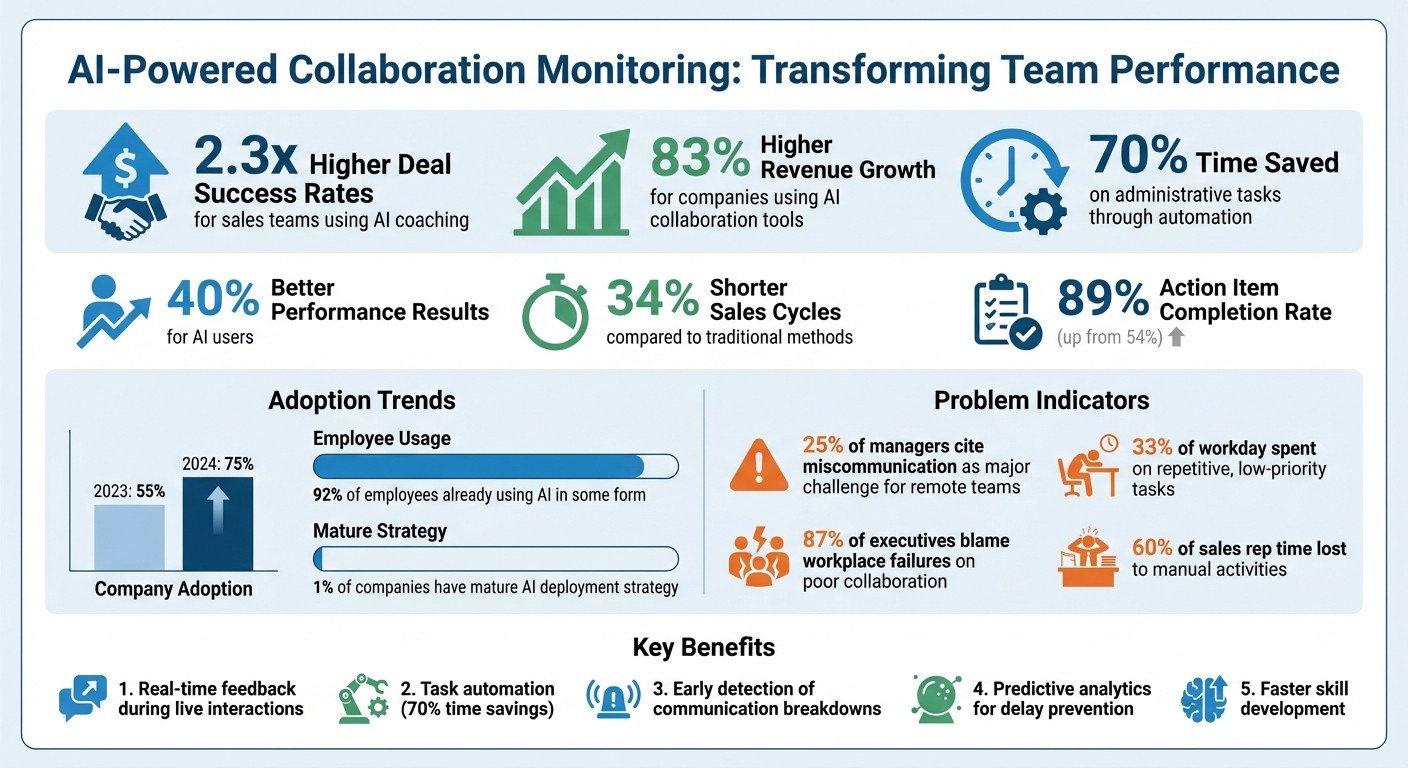
AI-Powered Collaboration Monitoring: Key Performance Metrics and Benefits
Measure What Matters: Quality-Focused Monitoring for Production AI Agents
What Is Real-Time Collaboration Monitoring?
AI's influence on real-time sales coaching has expanded into the realm of team collaboration, offering a transformative way to monitor communication and workflow. Real-time collaboration monitoring uses AI to track how teams interact, communicate, and progress on tasks as they happen. By analyzing data from tools like emails, ChatGPT for Teams, Slack, video calls, and project management platforms, this technology highlights key insights in the moment. It evaluates collaboration quality by pinpointing areas of engagement and identifying potential friction, allowing for timely interventions during a project’s lifecycle.
This kind of visibility is crucial for high-performing teams, especially as traditional methods struggle to keep up with the fast-paced nature of modern work. For example, 25% of managers cite miscommunication as a major challenge for remote teams [3], and 87% of executives blame workplace failures on poor collaboration [3]. Waiting until weekly reviews to address these issues often means it's too late to make meaningful changes. With real-time monitoring, teams can catch problems - like stalled projects or early signs of burnout - before they escalate.
The transition from manual tracking to AI-powered systems has been dramatic.
"Collaboration isn't just a metric. It's a battleground" [2].
By 2024, 75% of companies had adopted AI solutions using Natural Language Processing (NLP) for collaboration monitoring, up from 55% in 2023 [2]. Businesses leveraging these tools have reported 83% higher revenue growth and 34% shorter sales cycles compared to those sticking with traditional methods [5].
Core Components of Collaboration Monitoring
AI-driven collaboration monitoring works by combining three essential elements, each offering a unique perspective on team health and performance.
Communication Pattern Analysis examines how teams interact across various platforms. It tracks participation levels (e.g., who contributes during meetings), response times to messages, and the frequency of cross-team communication. This analysis can identify overlooked issues, such as a key stakeholder being left out of critical conversations, or highlight the contributions of team members working behind the scenes - those whose efforts might otherwise go unnoticed [2].
Workflow Tracking focuses on task progress and project velocity in real time. Instead of relying on periodic updates, AI tracks how tasks move through different stages, flagging potential delays before they impact deadlines.
Sentiment Detection uses NLP to evaluate the emotional tone in communication. By scanning chat logs, emails, and meeting transcripts, it identifies signs of stress or dissatisfaction. For instance, if team members frequently use words like "overwhelmed" or "stuck", the system can alert managers to step in before these feelings lead to burnout or turnover risks [2].
These components go beyond generating reports. They provide actionable insights that help teams maintain balance, ensure psychological safety, and acknowledge contributions that might otherwise remain invisible.
AI vs. Traditional Monitoring Methods
Traditional monitoring methods rely on manual data entry, self-reported updates, and periodic reviews. While a manager might check in weekly for a project update, by that time, critical issues may have already caused setbacks. AI-driven monitoring, on the other hand, processes vast amounts of data in real time - something manual methods simply can't achieve.
"An algorithm can't read the room - it can only count the words" [2].
Here's how the two approaches compare:
Feature | Traditional Monitoring | AI-Driven Monitoring |
|---|---|---|
Data Source | Manual logs, spreadsheets, attendance | Chat, email, transcripts, calendars |
Nature of Reports | Historical, subjective | Predictive, real-time, objective |
Scalability | Limited; requires manual input | High; automated across platforms |
Insight Depth | Quantitative | Qualitative (e.g., sentiment, diversity of ideas) |
Outcome | Reactive | Proactive (early warnings) |
AI monitoring doesn’t just analyze past data - it predicts future challenges. By examining historical trends, it can forecast project delays, gauge client satisfaction based on communication patterns, and even identify employees at risk of leaving [2]. For example, in April 2026, Channell, a global manufacturing firm, implemented AI tools to automate bill of materials reports for projects. This reduced decision-making times from days to just hours [4].
The shift from reactive to proactive monitoring reshapes team dynamics. Instead of firefighting after problems arise, managers can act early - redistributing resources, adjusting timelines, or addressing communication gaps before they grow into larger issues. This approach moves away from managing by hindsight and embraces leading with foresight, showcasing how AI-driven systems enable smarter, more effective team management. These advancements set the stage for exploring the next level of metrics and automation.
AI-Powered Metrics for Collaboration Health
AI has transformed how we measure team collaboration by analyzing data from communication platforms, project tools, and meeting software to generate real-time health scores. It’s not about counting emails or calendar invites anymore. Instead, modern AI evaluates interaction quality, participation balance, and the emotional tone of team exchanges.
This shift from quantity to quality is critical. Sales expert Jason Martinez sums it up perfectly:
Most sales teams are overwhelmed by data yet lacking actionable insight [10].
Rather than focusing on surface-level metrics like call volume, AI hones in on signals that reveal true engagement and outcomes.
Key Metrics Monitored by AI
AI uses these health scores to track specific metrics, helping teams quantify and improve performance.
Talk-to-listen ratios: Balanced conversations are crucial. For instance, reps who dominate 70% or more of a conversation face ghosting rates 3.2 times higher, as their monologues replace meaningful dialogue [13].
Response times and message sentiment: Beyond just measuring reply speed, AI detects emotional shifts that point to stress or withdrawal. A real-world example: MoodTracker AI flagged declining Slack activity among three engineers on a remote SaaS team. Combined with late-night work patterns and missed sprint reviews, the data revealed overwork caused by an absent colleague. Adjusting workloads reversed burnout indicators within a month [11].
Meeting participation metrics: These track who actively contributes and who stays silent, ensuring all voices are heard. For sales teams, AI can even score the relevance of questions asked in meetings, rather than just counting them [10].
Task handoff delays: AI identifies workflow bottlenecks by monitoring the clarity of next steps. Deals without confirmed follow-ups - complete with dates, attendee lists, and agendas - are 91% more likely to fall through [13].
Cognitive load and burnout risk: Advanced AI tracks "oscillation fatigue", the toll of constant task-switching. Dr. Vasileios Ioannidis warns:
The danger is not that AI will replace people. It is that AI will erode people while dashboards claim victory [7].
For sales teams, AI also evaluates script adherence, real-time conversion chances, and objection handling success rates [9][10]. It even measures how quickly reps improve their skills over 30-day periods, moving beyond static snapshots [10].
Early Warning Signals from AI Insights
AI doesn’t just capture current performance - it also identifies emerging issues before they escalate. As Sophia Chen, AI Tutorials Lead at AI Daily Shot, explains:
AI excels at picking up subtle, cumulative changes across multiple data points [11].
Burnout signals: AI flags patterns like negative sentiment in multiple messages over consecutive days, erratic work hours, or sudden drops in responsiveness. Frequent meeting declines or low participation scores can also indicate disengagement or silos forming [11][9].
Communication breakdowns: AI uncovers issues like unaddressed objections in sales recordings (seen in 68% of lost deals) or when key stakeholders are excluded from critical discussions. These problems often remain hidden until deals fall apart [13].
Coaching adherence rates: AI tracks how much coaching advice actually translates into behavior changes. Research shows reps forget 80% of feedback within a week without reinforcement. By monitoring follow-through on coaching recommendations, AI helps managers measure the true impact of their training [10].
Pairing leading metrics (like document edits) with lagging metrics (like meeting duration) offers even deeper insights. For example, one insurance provider reduced meeting times significantly by boosting asynchronous collaboration over a single quarter [8].
Sellers who integrate AI into their workflows are 3.7 times more likely to hit their quotas [9]. By identifying early warning signs, AI empowers managers to step in before minor issues snowball into major problems. As Nilansh Gupta, Co-founder & CEO of Nimitai, puts it:
Great sales coaching isn't about hearing every call. It's about hearing the right moment in every call [12].
Platforms like Coach Pilot leverage advanced AI to ensure sales teams can act on critical signals and drive success when it matters most.
Implementing AI in Your Collaboration Stack
Bringing AI into your collaboration tools is all about striking the right balance - integrating it smoothly without disrupting your team's workflows. Here's a compelling stat to consider: 92% of employees are already using AI in some form, yet only 1% of companies have a mature AI deployment strategy [14]. This gap presents a clear opportunity, but it also highlights a challenge. Many organizations are wrestling with unsanctioned AI use, with 57% of employees admitting they turn to unauthorized tools because official processes are often frustrating [14].
The key isn't to ban AI outright. Instead, offer secure, approved tools that work seamlessly with your existing platforms. Here's how you can make that happen.
Integration with Collaboration Tools
There are two main ways to weave AI into your collaboration stack: native tools and third-party agents. Native options, like Microsoft 365 Copilot, integrate directly into platforms like Teams and Outlook. On the other hand, third-party solutions connect through APIs or no-code platforms such as MindStudio and AgentiveAIQ [14].
Before enabling any AI tool, ensure backend features are properly configured. For example, activate transcription services for meeting summaries or set up cloud storage (via OneDrive or SharePoint) for document analysis [14]. It's also critical that any AI tool respects your existing security model. This means inheriting permissions from systems like Entra ID conditional access and sensitivity labels, ensuring users only access content they're authorized to view.
Today's AI tools go beyond individual capabilities to act as collaborative agents. These agents can join group chats, flag deadlines, summarize missed discussions, and even assign tasks - all within the tools your team already uses [17][6]. Implementation methods vary: Slack uses Block Kit for custom interfaces, while Teams relies on Adaptive Cards. However, no-code platforms can often simplify these differences, allowing for a single deployment across multiple tools [15].
As you integrate AI, it's essential to address privacy and data security concerns.
Privacy and Data Considerations
A staggering 73% of enterprises report critical data exposure risks after deploying AI tools like Copilot [16]. The problem isn't the AI itself but the permissions it inherits. Errin O'Connor, Founder & Chief AI Architect at EPC Group, puts it this way:
Deploying Copilot in Microsoft Teams is not a technology project - it is a governance project with technology components [16].
Before rolling out any AI tool, conduct a thorough permissions audit. Broad permissions, like granting "Everyone" or "All Users" access to sensitive folders, may have been harmless in the past but now pose significant risks when AI processes data at scale [16][18]. Use sensitivity labels, such as "Confidential - Executive Only", to restrict access to Teams channels and meetings. Enterprise-grade AI systems will respect these restrictions, ensuring protected content isn't shared with unauthorized users [16].
Look for AI providers that guarantee they won't use your data to train their models. Your customer information should remain private, with no inspection or retention by the provider. The best systems handle each request independently, maintaining strict isolation between interactions [18][19].
Phased Rollout and Change Management
Rolling out AI isn't just about the tech - it’s a leadership challenge. As McKinsey & Company warns:
AI adoption is a leadership challenge, not a technical one [14].
A phased rollout can help address both technical and cultural challenges. Start small with an IT pilot (25–50 users over 1–2 weeks), then expand to a business unit pilot (200–500 users over 3–6 weeks), and finally scale enterprise-wide in weekly waves (weeks 7–12). This approach lets you monitor performance and address bandwidth challenges as they arise.
During the IT and Security pilot, validate technical requirements and security controls [16]. The business unit pilot tests real-world workflows and identifies "AI Champions" - team members who can provide localized support and training on how to use AI effectively [14][16]. As you expand, keep an eye on performance issues, such as the 15–25% bandwidth overhead that AI processing and transcription can create. Make sure remote office networks can handle the load before enabling AI for distributed teams.
It's also important to tackle unsanctioned AI use directly. Many employees may already be using unapproved tools. Instead of blocking them, offer a secure alternative that addresses the same needs without exposing sensitive data [14]. For instance, when one global tech company found employees building unauthorized chatbots using public language models, they responded by providing a secure internal alternative rather than simply banning the practice [14].
Finally, establish ongoing governance. Conduct quarterly permissions audits and review usage analytics monthly. AI isn't a "set-it-and-forget-it" tool - it requires continuous oversight to adapt to your team's evolving needs while maintaining robust data security [16].
Platforms like Coach Pilot show how AI can integrate seamlessly into workflows. By embedding AI into your processes, you can bridge the gap between strategy and execution while safeguarding sensitive data and maintaining strong governance standards.
Acting on AI-Driven Insights
Integrating AI into your collaboration tools is just the first step. The real power lies in acting on the insights AI provides. Unlike traditional dashboards that only reflect past performance, AI-powered tools deliver insights in real-time, allowing you to address issues before they disrupt your team's progress.
As Simon Field, co-author of AI Lens, explains:
Governance starts with visibility. You can't manage what you can't map [21].
Here's how you can turn AI-generated insights into actionable strategies that improve team collaboration.
Turning Data into Action
AI dashboards go beyond tracking metrics - they uncover patterns that highlight inefficiencies in your workflows. Tools like Jira Align and Wrike analyze task handoffs, workload balance, and communication trends to identify potential issues such as scope creep, capacity overload, or recurring delays before they escalate [23].
For instance, imagine your AI system flags that a team member has been stuck waiting for credentials over multiple daily standups. That’s a "creeping blocker" that requires immediate attention, not something to postpone until the next weekly meeting [24]. Similarly, if sentiment analysis reveals a shift from detailed updates to vague status reports, it’s a cue to check in privately and address potential burnout [24].
To avoid overwhelming your team with constant notifications, configure alerts to trigger only for sustained anomalies in communication or workflow patterns. This ensures you're focusing on meaningful issues without creating alert fatigue.
Modern AI systems also use parallel sub-agents to monitor multiple platforms - like GitHub, Slack, and Teams - simultaneously. This provides a complete view of your team’s activity without the need to manually check each tool. For example, a sudden spike in GitHub issues or a noticeable drop in team sentiment can signal coordination problems that need immediate intervention [20].
To streamline responses, every alert should include a direct link to an actionable playbook. This allows your team to address problems quickly and effectively [25]. These immediate fixes also serve as a foundation for more strategic, forward-looking planning.
Using Predictive Analytics
While immediate actions help resolve current challenges, predictive analytics allow you to anticipate and prevent future problems. Instead of reacting to missed deadlines, AI can forecast potential delays weeks in advance by analyzing workload patterns, resource availability, and historical trends.
Platforms like Monday.com and Smartsheet offer visual forecasting tools that suggest resource reallocations before team members become overwhelmed [23]. If AI identifies that a specific team consistently struggles with a new workflow, it can recommend targeted training sessions to address the issue before frustration sets in [22].
A key factor in successfully using AI predictions is explainability. For business leaders to trust AI recommendations, they need to understand the reasoning behind them. Tools that provide SHAP values or feature importance analysis can clarify why an alert was triggered - whether it’s due to an uptick in task volume, changes in communication dynamics, or resource constraints [26][27].
As Dr. Adam Miner from Stanford University observes:
The future of human-AI collaboration lies not in replacement but in partnership – augmenting human capabilities while preserving the uniquely human elements of creativity, empathy, and judgment [26].
Start with small, impactful projects to build trust in predictive analytics. Once your team sees AI accurately predict and prevent collaboration issues, confidence and adoption will naturally grow [26][27].
Platforms like Coach Pilot exemplify how AI-driven insights can be seamlessly integrated into workflows. By delivering the right information at the right time, these tools help teams bridge the gap between strategy and execution.
How AI Automation Improves Collaboration
Collaboration often takes a hit when teams are bogged down by repetitive, low-priority tasks. On average, employees spend 33% of their workday on such tasks, while sales representatives lose a staggering 60% of their time to manual activities like CRM data entry [28][29]. AI automation steps in to tackle these time-consuming chores, freeing teams to focus on more impactful, strategic work.
By automating routine processes, teams experience what Ibby Syed, Founder of Cotera, calls "cognitive freedom" - the ability to focus on strategy and creativity without worrying about mundane tasks:
The value isn't just in the output - it's in the cognitive freedom during the meeting itself. When you know everything is being captured, you can actually think instead of transcribe. [30]
This shift from manual tasks to automated workflows not only saves time but also enhances the way teams collaborate in real time.
Automating Routine Tasks
AI simplifies meeting management by handling everything from joining calls to transcribing discussions and summarizing key decisions, questions, and action items. Take Cotera’s operations team, for example. In March 2026, this 14-person team, responsible for 40 to 55 meetings per week, reduced their documentation time from 11 hours to just 1.5 hours weekly. This adjustment saved $37,000 annually and boosted their action item completion rate from 54% to 89% [30].
But AI doesn’t stop at transcription. It can assign verbal commitments to specific team members, sync these tasks with project management tools, and send automated Slack reminders, ensuring nothing falls through the cracks. Instead of wasting 22 minutes hunting through Slack threads or email chains for a past decision, teams can now retrieve the needed context in just 30 seconds using a searchable archive of meeting transcripts [30]. This seamless automation not only reduces manual work but also connects different tools and systems effortlessly.
Connecting Workflows Across Systems
AI goes beyond saving time - it strengthens collaboration by linking previously isolated workflows. When AI bridges these gaps, its potential is fully realized. For instance, AI agents can listen to sales calls, extract qualification details like BANT (Budget, Authority, Need, Timeline) or MEDDIC criteria, and update CRM records automatically. This capability can save sales representatives 8 to 12 hours per week [29]. Beyond data entry, AI can draft personalized follow-up emails, route documents for approval, and integrate platforms across the collaboration ecosystem.
A great example is Beyond Better Foods, a healthy food company that adopted Slack AI in 2024 to streamline internal communication. COO Jen Haberman shared her experience:
With Slack AI, I can find answers and recap long conversations that help me quickly access key information to make the most informed decisions. [31]
AI also enables simple yet powerful triggers - like using a thumbs-up emoji to close tickets, initiate DevOps builds, or assign tasks based on workload and expertise [32].
For sales teams aiming to maximize real-time collaboration, platforms like Coach Pilot offer integrated solutions. These tools embed AI-driven coaching directly into sales workflows, creating a seamless bridge between planning and execution.
Measuring and Optimizing AI's Impact
When it comes to AI integration, measuring its impact is crucial for achieving efficiency. By combining real-time insights with automation, you can ensure your AI investments deliver tangible results.
Establishing Baseline Metrics
Before introducing AI-driven collaboration tools, it's important to set a solid foundation by gathering 3–6 months of historical interaction data. This data helps establish a performance baseline, accounting for patterns and seasonal fluctuations in your team's workflow [34].
Your baseline should include various metrics:
Leading indicators like engagement levels and behavior scores.
Lagging indicators such as close rates and deal sizes.
Efficiency metrics like manager time saved and ramp time [35].
Traditional monitoring often focuses on quantity - like calls made or emails sent. In contrast, AI-driven monitoring emphasizes quality metrics, including customer sentiment, script adherence, and conversation effectiveness [9]. For instance, TechFlow Solutions, a 6,000-person software firm, adopted the AI Adoption Facilitation Index (AAFI) in early 2024. They found top-performing teams scored between 1.4–1.9 on the AAFI, while lower-performing teams scored just 0.3–0.6. After targeted manager training, they saw a 27% increase in AAFI scores, with high-performing teams experiencing 35% faster code review cycles and a 22% drop in bug rates over two quarters [34].
To justify your AI investment, calculate ROI early. Use the formula:
ROI (%) = ([Total Value Generated] - [Total AI License Cost]) / [Total AI License Cost] × 100 [33].
For example, employees using AI assistants like Copilot saved an average of 3 hours per week, reclaiming about 10% of their workweek [33]. These metrics form the groundwork for refining AI integration efforts and sales enablement.
Continuous Improvement Strategies
Once your baseline metrics are set, the next step is to focus on continuous refinement. AI processes need ongoing adjustments to ensure consistent results. Start by monitoring coaching coverage, which AI can elevate from a manual 1–2% to full 100% coverage [35]. Brooke Roney, Co-Founder of Parlay, highlighted the importance of measurable coaching:
We knew coaching mattered but had no way to prove it. When budget season came around, coaching programs were always the first on the chopping block because hard numbers were lacking [35].
To ensure alignment, run AI tools alongside existing processes for 2–4 weeks. This trial period allows you to compare AI-generated feedback with human judgment and fine-tune your rubrics [37]. Bureau, for example, introduced AI coaching tools in 2025 and achieved a 30% increase in deal conversions by improving their discovery processes [36]. Similarly, Versa Networks used AI-powered pipeline reviews to identify execution gaps, cutting managers’ coaching time in half while enhancing team consistency [36].
Leverage real-time dashboards to track adoption and performance. These dashboards should provide automated alerts for drops in adoption or emerging performance gaps [34]. Tracking metrics like tool usage, workflow changes, and productivity improvements ensures AI tools are driving meaningful results. As Philip Arkcoll from Worklytics explains:
Measuring AI adoption means tracking not just whether employees have access to AI tools, but how consistently they use them, which workflows they've changed, and whether those changes translate into productivity gains [34].
The ultimate goal isn’t just saving time - it’s about reinvesting that time into high-value, client-facing activities that drive business growth [38].
Conclusion
AI-driven collaboration monitoring is changing how sales teams operate by moving from reactive analysis to proactive performance enhancement. Instead of waiting days for post-call reviews, sales reps now get immediate feedback to refine their approach before deals slip away. This kind of real-time intelligence can be the difference between merely understanding what went wrong and actually closing the deal.
The impact is clear: deals with real-time coaching interventions close at 2.3 times the rate of uncoached calls [1], and sales reps using AI conversation intelligence are nearly 90% more likely to meet their quotas [39]. Nilansh Gupta, Co-founder & CEO of Nimitai, sums it up perfectly:
The most expensive moment in sales isn't when a deal closes badly. It's the five seconds before that - when a buyer signals something important and the rep doesn't catch it [1].
This shift goes beyond individual performance. Automating tasks like call scrubbing, note-taking, and CRM updates frees up managers to focus on strategic leadership rather than administrative work. AI doesn’t replace human judgment - it enhances it, making coaching a consistent, data-driven process instead of an occasional effort.
Sales teams that embrace sales insights report efficiency gains of 10–15% [37], and AI-enabled teams are 1.3 times more likely to achieve revenue growth [36]. By adopting this technology, organizations can adapt faster, coach smarter, and close more deals in a fast-changing business landscape.
However, success relies on thoughtful execution. Start with pilot programs, ensure seamless CRM integration, and tailor AI tools to align with your messaging and buyer personas. When coaching becomes systematic and data-driven, you’re not just improving individual calls - you’re building a more predictable and high-performing sales team.
At Coach Pilot, our platform uses AI-driven insights to deliver tailored sales playbooks, immersive training, and real-time coaching - bridging the gap between strategy and execution.
FAQs
What data does AI monitor in real time?
AI monitors real-time conversation cues, including speech patterns, tone of voice, objections, deal qualification progress, and overall conversation flow. This enables it to offer instant feedback during sales calls, helping improve decision-making and communication skills on the spot.
How does AI spot burnout early?
AI can spot early signs of burnout by examining patterns in workload, behavior, and physiological data. Using real-time monitoring and predictive tools, it identifies potential issues before they escalate, allowing for timely actions to help individuals and promote better overall well-being.
How do you roll out AI monitoring safely?
To introduce AI monitoring responsibly, it's important to establish clear guidelines and build trust with your team. AI tools should be designed to assist rather than monitor, prioritizing openness and maintaining a sense of collaboration. Actively involve team members in the process, explaining the purpose behind the tools and how they’ll be used. Focus on providing constructive feedback that helps improve performance rather than creating a sense of surveillance. Being upfront about how data is collected and used is essential for fostering trust and ensuring the tools are implemented ethically.
Related Blog Posts

Remove the guesswork from winning more deals.